<?xml version="1.0" encoding="utf-8"?><feed xmlns="http://www.w3.org/2005/Atom" ><generator uri="https://jekyllrb.com/" version="4.3.4">Jekyll</generator><link href="http://blog.foxio.io/feed.xml" rel="self" type="application/atom+xml" /><link href="http://blog.foxio.io/" rel="alternate" type="text/html" /><updated>2024-10-15T18:15:44+00:00</updated><id>http://blog.foxio.io/feed.xml</id><title type="html">FoxIO Blog</title><subtitle>FoxIO is a technology innovations company focused on creating simple, highly-effective solutions to major industry problems</subtitle><entry><title type="html">Introducing EVA — The Employee Verification App</title><link href="http://blog.foxio.io/introducing-eva-the-employee-verification-app" rel="alternate" type="text/html" title="Introducing EVA — The Employee Verification App" /><published>2024-10-14T00:00:00+00:00</published><updated>2024-10-14T00:00:00+00:00</updated><id>http://blog.foxio.io/introducing-eva-the-employee-verification-app</id><content type="html" xml:base="http://blog.foxio.io/introducing-eva-the-employee-verification-app"><![CDATA[<p>And the solution to Employee AI / Voice Phishing</p>

<h2 id="tldr">TL;DR</h2>

<p>EVA is a chat app that prevents voice phishing and AI-assisted phishing attacks within organizations by giving employees the ability to validate each other via MFA, in seconds. It also assists in secure incident response and securing business processes. This will stop your next red team engagement or ransomware attack in its tracks. EVA takes just a few minutes to set up; you can try it for free here: <a href="https://eva.foxio.io/">https://eva.foxio.io/</a></p>

<p>EVA was created by <a href="https://foxio.io/">FoxIO</a>, a cyber innovations company responsible for standards such as <a href="https://blog.foxio.io/ja4%2B-network-fingerprinting">JA4+ Network Fingerprinting</a>, which are used by global governments and most of the Fortune 500.</p>

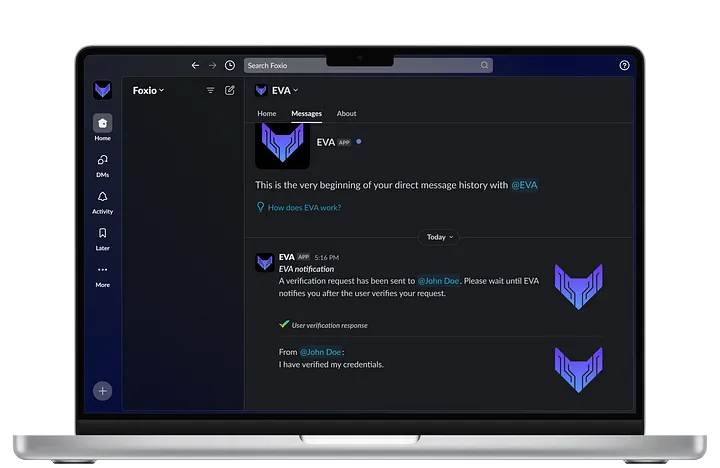
<p><a href="../assets/img/2024-10-14/mockup.webp" data-lightbox="/assets/img/2024-10-14/mockup.webp" data-title="EVA displayed on a laptop"><img src="../assets/img/2024-10-14/mockup.webp" alt="" class="mx-auto" style="" /></a></p>

<h2 id="the-ai-assisted-voice-phishing-problem">The (AI-Assisted) Voice Phishing Problem</h2>

<p>Voice phishing, or vishing, as it is sometimes called, is the practice where a malicious actor calls or texts an employee’s phone pretending to be another employee. The actor often creates a sense of urgency with the employee, requesting help, access, or anything else that can help the threat actor achieve their goals. In these situations, employees are usually skeptical of the call, but because they lack any means of validating that the other person is who they say they are, they tend to follow through with the request.</p>

<p>For some recent examples, see:
<a href="https://www.cnn.com/2024/02/04/asia/deepfake-cfo-scam-hong-kong-intl-hnk/index.html">Finance worker pays out $25 million after video call with deepfake ‘CFO’</a></p>

<p><a href="https://www.darkreading.com/cyber-risk/cybercriminals-impersonate-chief-exec-s-voice-with-ai-software">Cybercriminals Impersonate Chief Exec’s Voice with AI Software Losing $243,000</a></p>

<p><a href="https://www.vox.com/technology/2023/9/15/23875113/mgm-hack-casino-vishing-cybersecurity-ransomware">MGM Loses $100 Million After Attacker Calls Helpdesk Pretending to be Employee</a></p>

<p>And most of us have experienced receiving texts from the “CEO” asking us to urgently buy gift cards. The solution to phishing is not user education, it’s in giving users the tools to easily verify everything.</p>

<h2 id="the-employee-verification-app-eva">The Employee Verification App (EVA)</h2>

<iframe width="560" height="315" class="mx-auto" src="https://www.youtube.com/embed/DzyT3B-nlOU?si=6RsDXGmnncjdECG8" title="YouTube video player" frameborder="0" allow="accelerometer; autoplay; clipboard-write; encrypted-media; gyroscope; picture-in-picture; web-share" referrerpolicy="strict-origin-when-cross-origin" allowfullscreen=""></iframe>

<p>EVA is an app that can be added to your company’s existing communication platform, (e.g., Slack, Teams), and interfaces with your existing multi-factor authentication (MFA) provider (e.g., Okta, Google). The app enables employees to validate each other via MFA within seconds. The app has been specifically designed to be as simple and easy to use as possible so that anyone would be able to use it within seconds, even if they’ve never used it before.</p>

<p><strong>Example Scenario 1:</strong></p>

<p>A threat actor sends Alice a phishing email.</p>

<p>Alice then receives a phone call. The person on the line says their name is John and that they’re from the company’s cyber security department. John says they detected malware on Alice’s workstation that was installed after she clicked on a phishing email. John says he needs access to Alice’s machine immediately to determine the extent of the infection.</p>

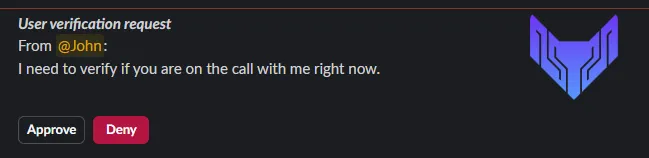
<p>Alice tells John, “Company policy is that I verify you first.” Alice types “/eva-verify @John” into the company’s Slack workspace. This sends John a message asking if he is talking with Alice right now with two buttons, Approve or Deny.</p>

<p><a href="../assets/img/2024-10-14/user_verification_request.webp" data-lightbox="/assets/img/2024-10-14/user_verification_request.webp" data-title="User verification request"><img src="../assets/img/2024-10-14/user_verification_request.webp" alt="" class="mx-auto" style="" /></a></p>

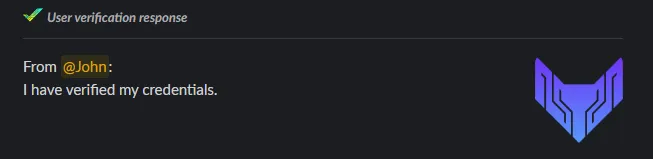
<p>If John clicks Approve, then he is redirected to the company’s MFA login to prove that he is, indeed, John and that his Slack account has not been compromised. This is because it is easy to steal a Slack session token, but difficult to steal a MFA device. If John successfully logs in, then EVA messages both parties to let them know that John has verified his credentials.</p>

<p><a href="../assets/img/2024-10-14/user_verification_response.webp" data-lightbox="/assets/img/2024-10-14/user_verification_response.webp" data-title="User verification response"><img src="../assets/img/2024-10-14/user_verification_response.webp" alt="" class="mx-auto" style="" /></a></p>

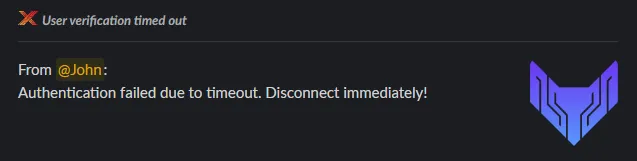
<p>If John clicks Deny or does not respond before the timeout window closes, both parties are notified and Alice is told by EVA to terminate the call immediately. This empowers Alice to hang up on the person without concern of reprisal because the company has told her to do so.</p>

<p><a href="../assets/img/2024-10-14/user_verification_timed_out.webp" data-lightbox="/assets/img/2024-10-14/user_verification_timed_out.webp" data-title="User verification timed out"><img src="../assets/img/2024-10-14/user_verification_timed_out.webp" alt="" class="mx-auto" style="" /></a></p>

<p><strong>Example Scenario 2:</strong></p>

<p>Charles is told to wire $3M to an account. Company policy is that another person must approve of a transfer this large.</p>

<p>Normally Charles would walk over to Deanna’s desk to get the approval in person but Deanna is working from home today. So Charles gets the approval from Deanna via Slack and to ensure that it is actually her, he verifies her by running “/eva-verify @Deanna” and configures the message with the identification number of the transaction. Deanna approves and verifies her credentials.</p>

<p>This second-person verification along with the transaction ID is then added to the EVA logs for automated auditing of wire transfer approvals.</p>

<p><strong>Example Scenario 3:</strong></p>

<p><a href="https://blog.foxio.io/ja4%2B-network-fingerprinting">JA4+</a> detects a reverse SSH shell from Chris’s system into production.</p>

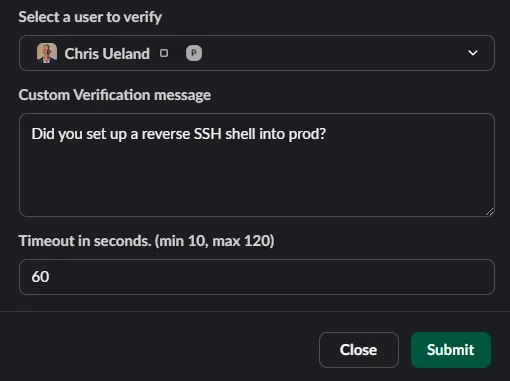
<p>A security analyst sends a Slack message to Chris asking if he opened this connection. Chris says he did because he was tired of logging in through the Bastion server. He says he won’t do it again. To ensure that Chris is the person on the other end of this chat, the security analyst runs “/eva-verify @chris” and sets the message to “Did you set up a reverse SSH shell into prod?” Chris clicks “Approve” but is unable to authenticate via MFA because, plot twist, it’s not Chris. The threat actor has access to Chris’s system, but does not have access to Chris’s MFA device and therefore cannot complete the EVA verification.</p>

<p>The security analyst is notified of the timeout failure and spins up a security incident.</p>

<p><a href="../assets/img/2024-10-14/user_verification_request_dialog.webp" data-lightbox="/assets/img/2024-10-14/user_verification_request_dialog.webp" data-title="User verification request dialog"><img src="../assets/img/2024-10-14/user_verification_request_dialog.webp" alt="" class="mx-auto" style="" /></a></p>

<h2 id="configuration-and-support">Configuration and Support</h2>

<p>After adding EVA to your communication platform, run “/eva-configure” to set it up. All default messages and timeout windows are configurable by administrators, but are also one-time configurable by the user at the time of sending.</p>

<p>Our documentation explains how to generate an MFA provider API token for EVA to use that has the minimum necessary permissions to request that someone authenticate, as well as to know if they authenticated.</p>

<p>EVA abides by the principle of least privilege. As such, EVA has the minimum amount of permissions necessary for its purpose with no other permissions. EVA cannot read channels, cannot read chats, and cannot take actions on behalf of users.</p>

<p>EVA logs can be downloaded from the app manually or automatically.</p>

<p>We have built the first version of EVA for Slack, and the app currently supports Okta as an MFA provider. We are actively adding support for more MFA providers and are building EVA for Microsoft Teams. Please let us know what communication platform/MFA provider combination or additional features you would like to see by emailing us at <a href="mailto:info@foxio.io">info@foxio.io</a>. We will prioritize the top requests.</p>

<p>EVA is patent pending.</p>

<h2 id="qa-this-will-be-updated-as-the-questions-come-in">Q&amp;A (this will be updated as the questions come in)</h2>

<p><strong>Q: Won’t this create MFA fatigue?</strong></p>

<p>A: Users only get to the MFA part if someone is trying to verify them and they are that actual person. This should be extremely rare as each user rarely calls another user asking for something critical.</p>

<p>In the case where a scammer is, for example, requesting gift cards from multiple users pretending to be the same person, that person may receive a lot of EVA verification requests, but since it’s not them, they can simply click Deny or ignore the requests triggering a timeout. In either case, EVA will alert the requesting user that it’s not them. No interaction with MFA is needed unless that person is actually requesting a bunch of gift cards from different people, which shouldn’t happen.</p>

<p>In short, this will not cause MFA fatigue. You could think of EVA as a fire extinguisher, use of it by any individual should be extremely rare but you’ll be glad you had it when you needed it.</p>

<p><strong>Q: This is a great idea! Why don’t we just build it ourselves?</strong></p>

<p>A: This is the classic Buy vs. Build argument. We’ve designed this to be extremely inexpensive as our goal is to end employee phishing. It should be vastly cheaper and faster to implement than building. Another pitfall of building is if the person or team who built it leaves, then the project can become abandoned. We’ll always be here to help.</p>

<p>If there’s any features you want that are missing, just ask, we’ll get them in so you can hit the ground running immediately.</p>

<h2 id="conclusion">Conclusion</h2>

<p>The Employee Verification App (EVA) empowers every employee with the ability to validate that any other employee is who they say they are, in seconds. EVA solves employee AI and voice phishing and assists in incident response and company policy enforcement. The solution to phishing is not user education, it’s in giving users the tools they need to stop the threat.</p>

<p>EVA is free to use for 90 days. After that, use promo code “EARLY” at checkout to lock in EVA at $0.25/user/month for life. This promotional price will never increase for organizations that sign up in 2024.</p>

<p>Try EVA today; setup takes only minutes: <a href="https://eva.foxio.io/">https://eva.foxio.io/</a></p>]]></content><author><name>John Althouse</name></author><summary type="html"><![CDATA[And the solution to Employee AI / Voice Phishing]]></summary><media:thumbnail xmlns:media="http://search.yahoo.com/mrss/" url="http://blog.foxio.io/assets/img/2024-10-14/mockup.webp" /><media:content medium="image" url="http://blog.foxio.io/assets/img/2024-10-14/mockup.webp" xmlns:media="http://search.yahoo.com/mrss/" /></entry><entry><title type="html">Investigating Surfshark and NordVPN with JA4T</title><link href="http://blog.foxio.io/investigating-surfshark-and-nordvpn-with-ja4t" rel="alternate" type="text/html" title="Investigating Surfshark and NordVPN with JA4T" /><published>2024-05-14T00:00:00+00:00</published><updated>2024-05-14T00:00:00+00:00</updated><id>http://blog.foxio.io/investigating-surfshark-and-nordvpn-with-ja4t</id><content type="html" xml:base="http://blog.foxio.io/investigating-surfshark-and-nordvpn-with-ja4t"><![CDATA[<p>Surfshark &amp; NordVPN Route Certain Ports Through Proxies?</p>

<h2 id="tldr">TL;DR</h2>

<p>This is an investigation of Surfshark and NordVPN using JA4TCP Fingerprinting.</p>

<p>We found that both Surfshark and NordVPN route certain ports through TCP proxies such as port 5060, which is only used for unencrypted phone calls. No other VPN providers proxy traffic in this way. The reason for the proxying is unknown. Additionally, we found that NordVPN’s proxy is misconfigured, causing increased latency and bandwidth usage.</p>

<p>Resources:<br />
<strong>JA4+ Network Fingerprinting:</strong> <a href="https://github.com/FoxIO-LLC/ja4">https://github.com/FoxIO-LLC/ja4</a><br />
<strong>JA4+ Blog:</strong> <a href="https://blog.foxio.io/ja4%2B-network-fingerprinting">https://blog.foxio.io/ja4%2B-network-fingerprinting</a><br />
<strong>JA4TCP Blog:</strong> <a href="https://blog.foxio.io/ja4t-tcp-fingerprinting">https://blog.foxio.io/ja4t-tcp-fingerprinting</a><br />
<strong>JA4TScan:</strong> <a href="https://github.com/FoxIO-LLC/ja4tscan">https://github.com/FoxIO-LLC/ja4tscan</a><br />
<strong>NMap:</strong> <a href="https://nmap.org/">https://nmap.org/</a><br />
<strong>gait:</strong> <a href="https://github.com/sandialabs/gait">https://github.com/sandialabs/gait</a></p>

<h2 id="quick-refresher-on-ja4-fingerprinting">Quick Refresher on JA4+ Fingerprinting</h2>

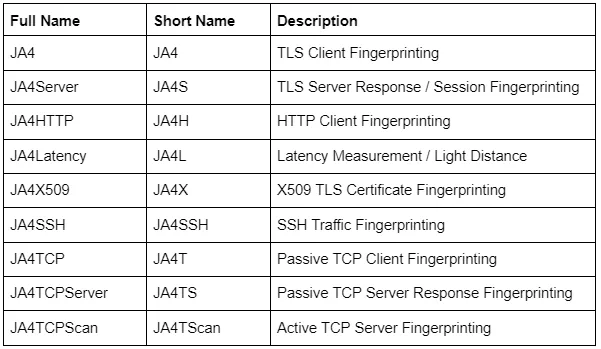
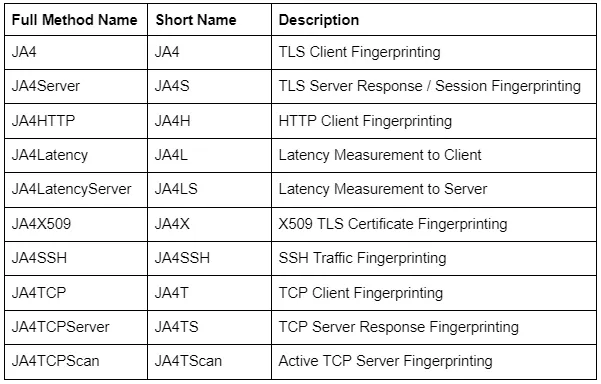
<p><a href="https://github.com/FoxIO-LLC/ja4">JA4+</a> is a suite of network fingerprinting methods that are being implemented across the industry and consist of the following methods, with more being added on a regular basis:</p>

<p><a href="../assets/img/2024-05-14/ja4+_methods.webp" data-lightbox="/assets/img/2024-05-14/ja4+_methods.webp" data-title="JA4+ methods"><img src="../assets/img/2024-05-14/ja4+_methods.webp" alt="" class="mx-auto" style="" /></a></p>

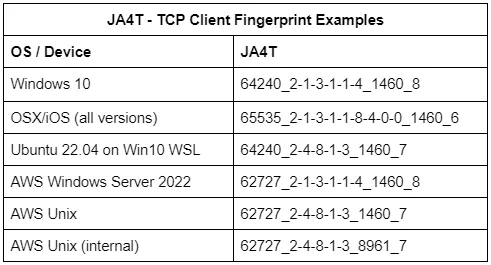
<p>For this investigation, we are primarily utilizing JA4TCP (JA4T). You can read up on how JA4T works in <a href="https://blog.foxio.io/ja4t-tcp-fingerprinting">this blog post</a>. In short, it’s a collection of artifacts from the TCP SYN and SYN-ACK packets which make up the TCP three-way handshake. These fingerprints allow us to fingerprint client and server operating systems, devices, certain applications, hosting/provider characteristics, if a connection is going through a tunnel, VPN or proxy, and enable us to troubleshoot network issues.</p>

<p><a href="../assets/img/2024-05-14/ja4tgif.gif" data-lightbox="/assets/img/2024-05-14/ja4tgif.gif" data-title="JA4T Gif"><img src="../assets/img/2024-05-14/ja4tgif.gif" alt="" class="mx-auto" style="" /></a></p>

<p><a href="../assets/img/2024-05-14/examples.webp" data-lightbox="/assets/img/2024-05-14/examples.webp" data-title="JA4T examples"><img src="../assets/img/2024-05-14/examples.webp" alt="" class="mx-auto" style="" /></a></p>

<p>For this blog, we will also be focusing on the Maximum Segment Size (MSS) part of the JA4T/S fingerprint. The MSS is the largest data payload size that a source will accept per packet, and is dependent on the overhead in the network connection. For example, the most common Maximum Segment Size (MSS) initially set is 1460, based on an ethernet Maximum Transmission Unit (MTU) of 1500. Observing an MSS of 1380 indicates that there is overhead on the network path, such as a tunnel or VPN, requiring a reduced MSS to account for it. Unique network conditions produce different amounts of overhead:</p>

<p><a href="../assets/img/2024-05-14/mtu.webp" data-lightbox="/assets/img/2024-05-14/mtu.webp" data-title="MTU"><img src="../assets/img/2024-05-14/mtu.webp" alt="" class="mx-auto" style="" /></a></p>

<p>Setting the MSS option to be larger than the actual available size will result in poor network performance, latency, and fragmentation. <a href="https://www.cloudflare.com/learning/network-layer/what-is-mss/">MSS Clamping</a> is a common method used to avoid this issue.</p>

<h2 id="surfshark--nordvpn-route-certain-ports-through-proxies">Surfshark &amp; NordVPN Route Certain Ports Through Proxies?</h2>

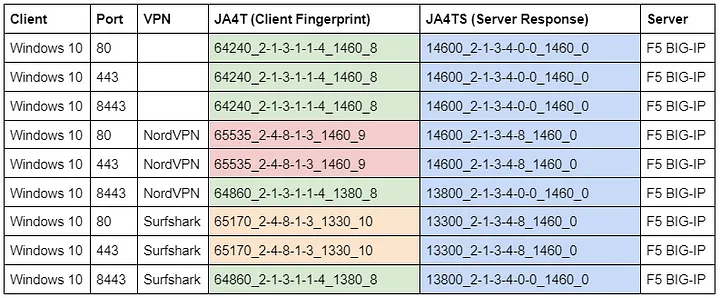
<p>Nord Security and Surfshark merged in 2022, and, together, they are the world’s largest VPN provider. While testing <a href="https://blog.foxio.io/ja4t-tcp-fingerprinting">JA4T</a> through NordVPN and listening on the server side, I noticed something odd in my network logs. Connections over port 443 from NordVPN had a JA4T of <em>65535_2–4–8–1–3_1460_9</em> (Unix), no matter what the client was. On the client side, I would see a normal-looking JA4T fingerprint where the MSS was 1380 (to account for the VPN overhead). So why does the server see a MSS of 1460? I tried connecting to the server using a different port, 8443, and only then did the server see the correct JA4T fingerprint of my client.</p>

<p>What is going on here? I did some further research, and here is what I found:</p>

<p>Observed network traffic on the <strong>server</strong> side:</p>

<p><a href="../assets/img/2024-05-14/server_traffic.webp" data-lightbox="/assets/img/2024-05-14/server_traffic.webp" data-title="Observed network traffic on the server side"><img src="../assets/img/2024-05-14/server_traffic.webp" alt="" class="mx-auto" style="" /></a></p>

<p>Why does the client TCP fingerprint change from Windows to Unix when connecting through Nord and Surfshark, but only over ports 80 and 443?</p>

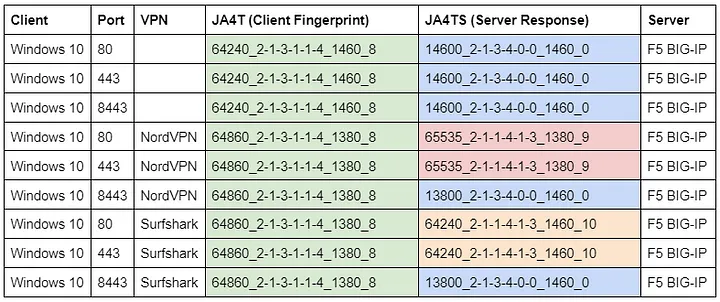
<p>Observed network traffic on the <strong>client</strong> side:</p>

<p><a href="../assets/img/2024-05-14/client_traffic.webp" data-lightbox="/assets/img/2024-05-14/client_traffic.webp" data-title="Observed network traffic on the client side"><img src="../assets/img/2024-05-14/client_traffic.webp" alt="" class="mx-auto" style="" /></a></p>

<p>Why is the server’s TCP response fingerprint different when connecting through Nord and Surfshark, but only over ports 80 and 443?</p>

<p>When looking at latency measurements and hop counts with <a href="https://blog.foxio.io/ja4%2B-network-fingerprinting">JA4L</a>, I noticed that NordVPN and Surfshark would initiate the TCP three-way handshake from their exit node and that the hop counts were different, but only over ports 80 and 443. All of these observations led me to believe that NordVPN and Surfshark are rerouting certain ports to proxies that intercept the TCP connection.</p>

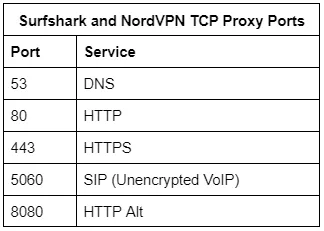
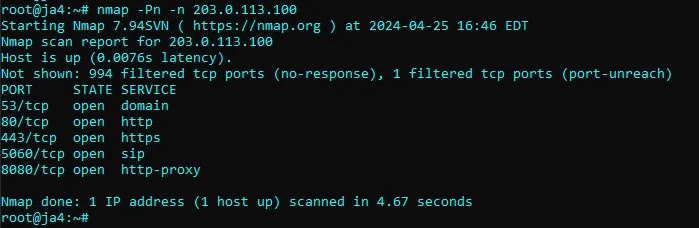
<p>To confirm this theory, I ran a SYN scan of all ports against an IP address for which no server exists. The scan should return no results since the destination server does not exist. However, both NordVPN and Surfshark responded on the following ports, which confirms that they are routing these ports through TCP proxies:</p>

<p><a href="../assets/img/2024-05-14/tcp_proxy_ports.webp" data-lightbox="/assets/img/2024-05-14/tcp_proxy_ports.webp" data-title="Surfshark and NordVPN TCP proxy ports"><img src="../assets/img/2024-05-14/tcp_proxy_ports.webp" alt="" class="mx-auto" style="" /></a></p>

<p>If you have NordVPN or Surfshark, you can test this yourself by running:</p>

<p><code class="language-plaintext highlighter-rouge">nmap -v -Pn -n 203.0.113.100</code> (or use any other IP that is not in use)</p>

<p><a href="../assets/img/2024-05-14/nmap.webp" data-lightbox="/assets/img/2024-05-14/nmap.webp" data-title="Nmap scan on unused port"><img src="../assets/img/2024-05-14/nmap.webp" alt="" class="mx-auto" style="" /></a></p>

<p><a href="https://telegram.org/">Telegram</a> is a service that runs over several ports, including ports 80 and 443. Telegram does not use TLS but instead uses <a href="https://core.telegram.org/mtproto">MTProto</a>, a proprietary protocol that encrypts messages over several protocols, including HTTP. I connected directly to Telegram and then connected through NordVPN to see if there was a difference:</p>

<p><a href="../assets/img/2024-05-14/telegram.webp" data-lightbox="/assets/img/2024-05-14/telegram.webp" data-title="Connecting to Telegram directly vs. connecting via NordVPN"><img src="../assets/img/2024-05-14/telegram.webp" alt="" class="mx-auto" style="" /></a></p>

<p>When connecting directly, the client sends an HTTP POST to the server. The server responds with an ACK, then a FIN ACK to close the connection. When connecting over NordVPN, the client sends an HTTP POST to the server, the server responds with an HTTP 200 OK, and then both the client and the server send FIN ACKs to close the connection.</p>

<p>This discrepancy is interesting. I don’t know what the reason is, but it is repeatable.</p>

<p>I tested this with other VPN providers, including Private Internet Access and Proton VPN, but did not observe the same behavior. The discrepancy appears to be unique to Surfshark and NordVPN. So, why are they running only these ports through TCP proxies?</p>

<p>…</p>

<p>Let’s assume that it’s for performance reasons, perhaps as a load-balancing strategy.</p>

<p>NordVPN’s TCP proxy has a JA4T of <em>65535_2–4–8–1–3_1460_9</em>. Notice the MSS of 1460.</p>

<p>The actual client’s JA4T is <em>64860_2–1–3–1–1–4_1380_8</em>. Notice the MSS of 1380 due to the VPN overhead.</p>

<p>Advertising an MSS higher than what the client can accept should result in worse performance, not better. I tested this theory by connecting to a website with NordVPN over port 443 (through their proxy) and over port 8443 (bypassing the proxy). The results were as expected:</p>

<p><a href="../assets/img/2024-05-14/nordvpn_options.webp" data-lightbox="/assets/img/2024-05-14/nordvpn_options.webp" data-title="Connecting to a website with NordVPN over port 443 and port 8443"><img src="../assets/img/2024-05-14/nordvpn_options.webp" alt="" class="mx-auto" style="" /></a></p>

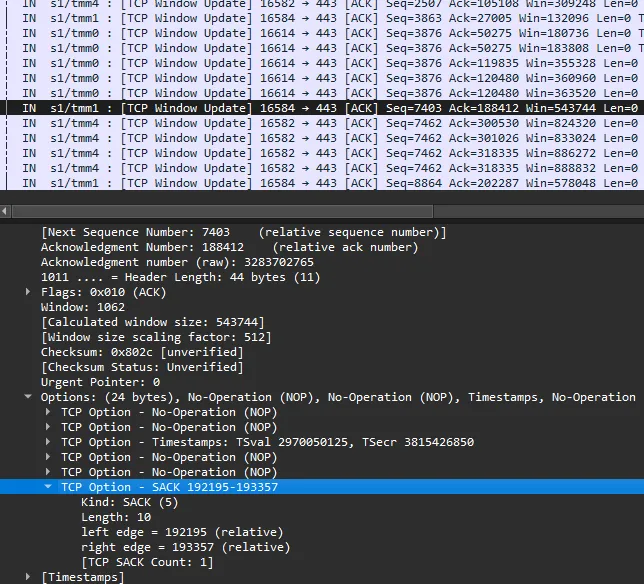
<p>When bypassing Nord’s proxy, the server sends data with a packet size of 1380: the maximum segment size of the VPN connection. In this test, 381 packets were sent back and forth to load the webpage completely.</p>

<p>When going through Nord’s proxy, the server sends packets with the requested segment size of 1460. The proxy, unable to forward those packets to the client because the client can only handle 1380, sends hundreds of TCP SACKs to the server with updated Window Sizes, essentially asking the server to resend the previous packets, but at smaller sizes. As a result, 962 packets were needed to load the same webpage. This back-and-forth increased latency for the client and doubled the bandwidth between NordVPN and the server, as the server had to send the same data twice.</p>

<p>So, the proxies are not for performance reasons?</p>

<p>Interestingly, Surfshark’s TCP proxy has a JA4T of <em>65170_2–4–8–1–3_1330_10.</em> Notice the MSS of 1330, which is the correct size given the overhead of the VPN and the proxy, and therefore does not suffer the performance impact that Nord has.</p>

<p>Because of this, I believe that NordVPN is using a similar proxy infrastructure to Surfshark’s — for still unknown reasons — but NordVPN has its proxy misconfigured by not <a href="https://www.cloudflare.com/learning/network-layer/what-is-mss/">clamping MSS</a> to 1330, like Surfshark. Fixing this will reduce latency for customers and reduce NordVPN’s infrastructure cost.</p>

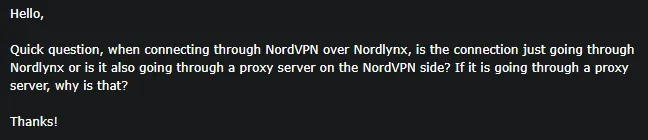
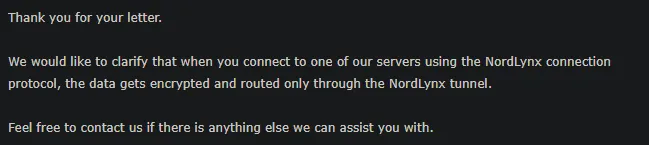
<p>Both NordVPN and Surfshark tout the ability to block viruses and ads, so perhaps the proxies are related to that. But then why proxy port 5060, which is only used for unencrypted phone calls? I contacted NordVPN to find out — there has to be a good reason:</p>

<p><a href="../assets/img/2024-05-14/nordvpn_contact.webp" data-lightbox="/assets/img/2024-05-14/nordvpn_contact.webp" data-title="NordVPN contact query"><img src="../assets/img/2024-05-14/nordvpn_contact.webp" alt="" class="mx-auto" style="" /></a></p>

<p><a href="../assets/img/2024-05-14/nordvpn_response.webp" data-lightbox="/assets/img/2024-05-14/nordvpn_response.webp" data-title="NordVPN contact response"><img src="../assets/img/2024-05-14/nordvpn_response.webp" alt="" class="mx-auto" style="" /></a></p>

<p>It appears that at least the support team is unaware of the proxy servers.</p>

<p>Other potential reasons for the proxies include being a <a href="https://www.imperva.com/learn/ddos/transparent-proxy/">transparent caching web proxy</a>. <a href="https://dnsrpz.info/">DNS RPZ</a> may account for port 53. <a href="https://www.fcc.gov/calea">CALEA</a> could explain port 5060, but so could <a href="https://learn.microsoft.com/en-us/openspecs/office_protocols/ms-sdpext/d2c16650-cefb-4f77-acbe-b958e909135b">SRTP</a>. Any assumptions would be pure speculation without more data and therefore this blog makes none.</p>

<p>I hate to end this blog with more questions than answers, so I will post an update if I find out more. Until then, this was an interesting hunt that, at the very least, found performance misconfigurations at NordVPN, all triggered by an unexpected JA4T fingerprint in my network logs.</p>

<h2 id="update-5152024">UPDATE 5/15/2024</h2>

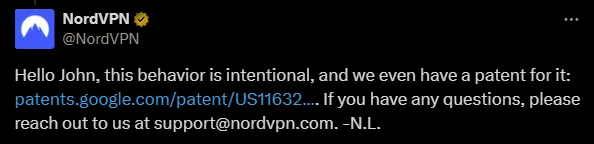
<p>NordVPN has responded.</p>

<p><a href="../assets/img/2024-05-14/nordvpn_response_2.webp" data-lightbox="/assets/img/2024-05-14/nordvpn_response_2.webp" data-title="NordVPN X response"><img src="../assets/img/2024-05-14/nordvpn_response_2.webp" alt="" class="mx-auto" style="" /></a></p>

<p>That patent is <a href="https://patents.google.com/patent/US11632267B2/en">https://patents.google.com/patent/US11632267B2/en</a> which looks to be a method of offloading TCP overhead through a VPN connection. The idea being that if a connection is lossy (think mobile phone with a poor signal), the TCP retransmissions are only on one side of the connection rather than all the way back and forth.</p>

<p>This makes sense and the patent would explain why we’re not seeing this from other VPN vendors. Though, I’m still confused about the amount of TCP SACKS seen from NordVPN on the server side as well as the discrepancy in MSS between Nord and Surfshark. That still may be worth a look on their end.</p>

<p>In any case, I hope this blog demonstrates the relevance and value of analyzing all of the low-level aspects of connections. Thanks to NordVPN for the explanation!</p>]]></content><author><name>John Althouse</name></author><summary type="html"><![CDATA[Surfshark &amp; NordVPN Route Certain Ports Through Proxies?]]></summary><media:thumbnail xmlns:media="http://search.yahoo.com/mrss/" url="http://blog.foxio.io/assets/img/2024-05-14/ja4tgif.gif" /><media:content medium="image" url="http://blog.foxio.io/assets/img/2024-05-14/ja4tgif.gif" xmlns:media="http://search.yahoo.com/mrss/" /></entry><entry><title type="html">JA4T: TCP Fingerprinting</title><link href="http://blog.foxio.io/ja4t-tcp-fingerprinting" rel="alternate" type="text/html" title="JA4T: TCP Fingerprinting" /><published>2024-04-23T00:00:00+00:00</published><updated>2024-04-23T00:00:00+00:00</updated><id>http://blog.foxio.io/ja4t-tcp-fingerprinting</id><content type="html" xml:base="http://blog.foxio.io/ja4t-tcp-fingerprinting"><![CDATA[<p>And How to Use It to Block Over 80% of Internet Scan Traffic</p>

<h2 id="tldr">TL;DR</h2>

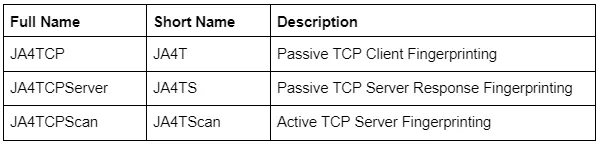
<p>JA4T/S/Scan are the latest additions to the JA4+ family of network fingerprinting tools.</p>

<p><a href="../assets/img/2024-04-23/ja4tcptable.webp" data-lightbox="/assets/img/2024-04-23/ja4tcptable.webp" data-title="Comparison of JA4T, JA4TS, and JA4TScan"><img src="../assets/img/2024-04-23/ja4tcptable.webp" alt="" class="mx-auto" style="" /></a></p>

<p>These tools add the ability to fingerprint client and server operating systems, devices, particular applications, hosting characteristics, and even if a connection is going through a tunnel, VPN, or proxy. If built into a WAF, firewall, or load balancer, it becomes possible to block malicious traffic.</p>

<p>JA4+: <a href="https://github.com/FoxIO-LLC/ja4">https://github.com/FoxIO-LLC/ja4</a><br />
JA4TScan: <a href="https://github.com/FoxIO-LLC/ja4tscan">https://github.com/FoxIO-LLC/ja4tscan</a><br />
Original blog on JA4+: <a href="https://blog.foxio.io/ja4%2B-network-fingerprinting">https://blog.foxio.io/ja4%2B-network-fingerprinting</a></p>

<p>This project was inspired by <a href="https://lcamtuf.coredump.cx/p0f3/">p0f</a> (Michał Zalewski), <a href="https://github.com/zk7/hershelplus">Hershel+</a> (Zain Shamsi &amp; Dmitri Loguinov), and <a href="https://github.com/sandialabs/gait/tree/main">gait</a> (Charles Smutz &amp; Brandon Thomas). You guys are amazing!</p>

<h2 id="tcp-refresher">TCP Refresher</h2>

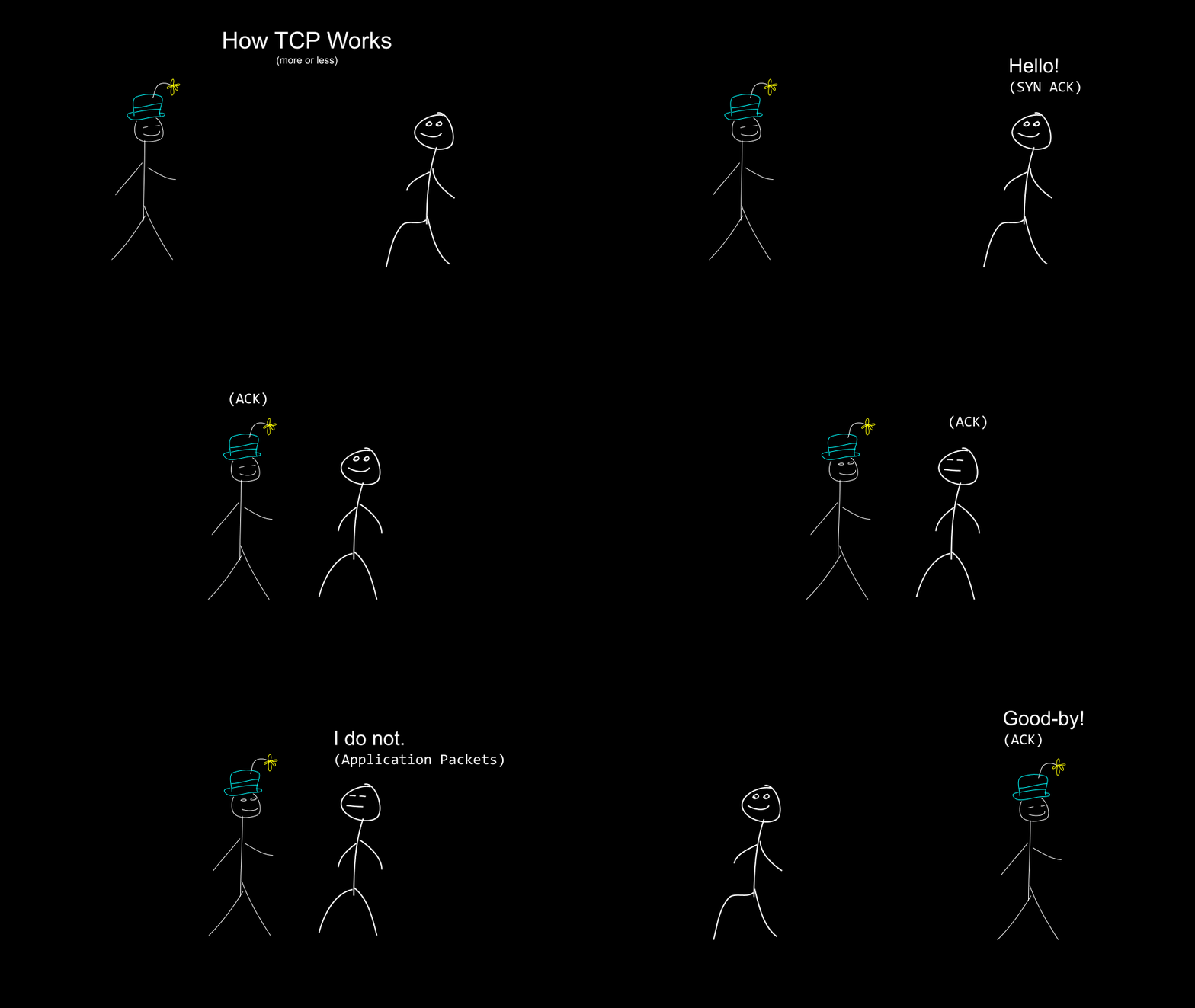
<p><a href="../assets/img/2024-04-23/tcp.gif" data-lightbox="/assets/img/2024-04-23/tcp.gif" data-title="Attempting to use a page from the children's book, “Go Dog. Go!” to explain TCP."><img src="../assets/img/2024-04-23/tcp.gif" alt="" class="mx-auto" style="" /></a></p>
<figcaption class="text-center">Attempting to use a page from the children's book, “Go Dog. Go!” to explain TCP.</figcaption>

<p>TCP connections start with a TCP 3-way handshake. First, the client sends a TCP packet with the SYN flag to the server with its preferred TCP communication settings. If listening, the server will respond with a SYN-ACK packet and its preferred TCP communication settings. Then, the client will send an ACK, immediately followed by the application request, which could be HTTPS, SSH, etc. If the server is listening with that application protocol it will begin application communication. The connection is closed with a FIN ACK and the other side agrees with an ACK.</p>

<p>If one side does not respond with an ACK, the other side will retransmit the packet(s) several times at varying intervals before giving up. The number of retransmissions and the time interval between them is dependent on the operating system’s netcode.</p>

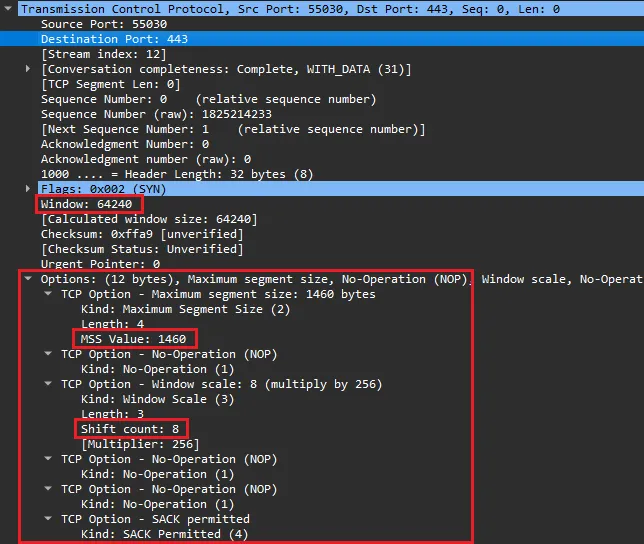
<p><a href="../assets/img/2024-04-23/tcpsyn.webp" data-lightbox="/assets/img/2024-04-23/tcpsyn.webp" data-title="A TCP SYN packet and the parts that we are looking at."><img src="../assets/img/2024-04-23/tcpsyn.webp" alt="" class="mx-auto" style="" /></a></p>
<figcaption class="text-center">A TCP SYN packet and the parts that we are looking at.</figcaption>

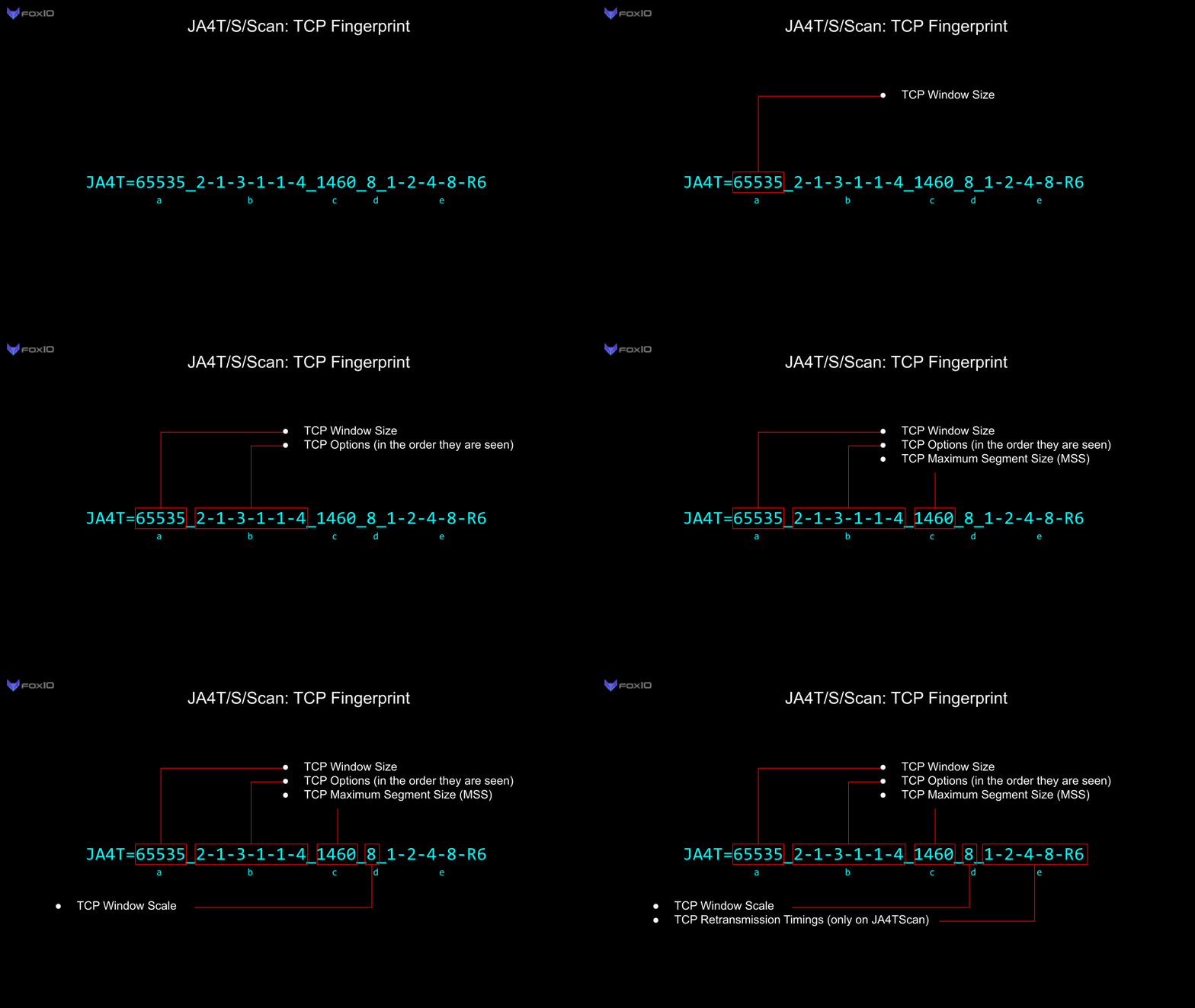
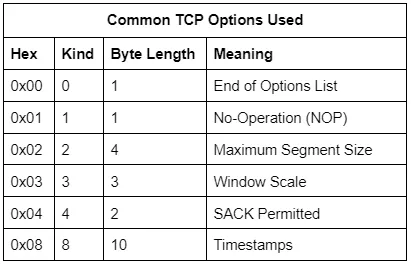
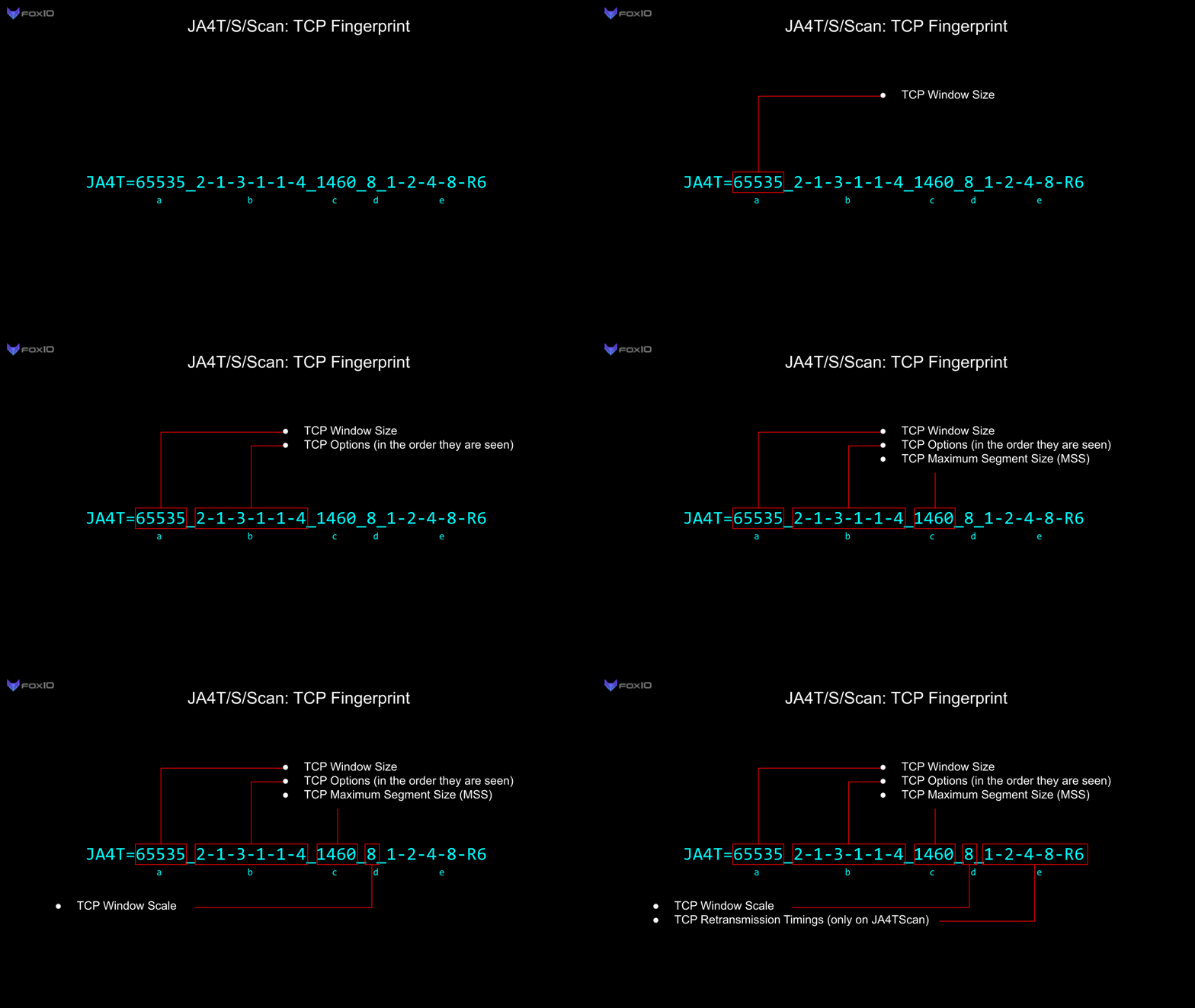
<p>The communication settings in the initial SYN and SYN-ACK packets are determined by the netcode used in the operating system. A <strong>Window Size</strong>, the maximum amount of data to be transmitted before an ACK is needed, is limited to two bytes and is a required field. <strong>TCP Options</strong> are not required but are used by every modern operating system.</p>

<p><a href="../assets/img/2024-04-23/tcpoptions.webp" data-lightbox="/assets/img/2024-04-23/tcpoptions.webp" data-title="Common TCP Options Used"><img src="../assets/img/2024-04-23/tcpoptions.webp" alt="" class="mx-auto" style="" /></a></p>

<p>There are <a href="https://www.iana.org/assignments/tcp-parameters/tcp-parameters.xhtml">many other TCP options</a> going up to Kind 254, though they are mostly used in specialized environments (think SCADA and Mainframes). The total length of the TCP options list must be evenly divisible by 4. That is the reason why the NOP option exists, to pad out the options list length to a divisible byte count.</p>

<p>The <strong>Window Scale</strong> acts as a multiplier for the Window Size, allowing the actual Window Size to be much larger than 65535. For example, if the Window Size is 64240 and the Window Scale is set to 8, then the actual Window Size is 64240*2⁸, or 16445440.</p>

<p>The <strong>Maximum Segment Size (MSS)</strong> is the largest data payload size that the source will accept per packet and is dependent on the overhead in the network connection. For example, the most common Maximum Segment Size (MSS) initially set is 1460, based on an ethernet MTU of 1500. Observing an MSS of 1380 would indicate that there is overhead on the network path, such as a tunnel or VPN, requiring a reduced MSS to account for the overhead. Different network conditions produce different amounts of overhead:</p>

<p><a href="../assets/img/2024-04-23/mss.webp" data-lightbox="/assets/img/2024-04-23/mss.webp" data-title="MSS"><img src="../assets/img/2024-04-23/mss.webp" alt="" class="mx-auto" style="" /></a></p>

<p>Manually setting an MSS option to be higher than the actual available size will result in poor network performance, latency, and fragmentation.</p>

<h2 id="previous-tcp-fingerprinting-tools">Previous TCP Fingerprinting Tools</h2>

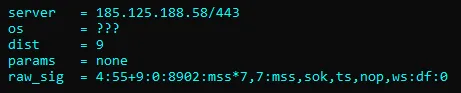
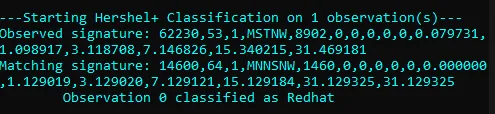
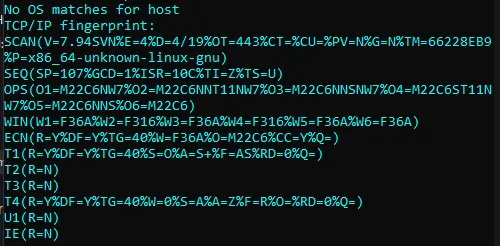
<p>Previous TCP fingerprinting tools, like Nmap (2006) and p0f (2013), are designed to fuzzy match with known operating systems and, as such, produce fingerprints that are not meant to be logged or used as pivot points in analysis but rather to be used to map back to an OS or device list. Their raw fingerprints include variable values like hop count which change from connection to connection, making it difficult to share raw fingerprint strings across the industry as each observer would see something slightly different depending on where they were observing. These tools were fantastic for their use case and are still very valuable today, many years after they came out.</p>

<p><a href="../assets/img/2024-04-23/p0f.webp" data-lightbox="/assets/img/2024-04-23/p0f.webp" data-title="p0f"><img src="../assets/img/2024-04-23/p0f.webp" alt="" class="mx-auto" style="" /></a></p>
<figcaption class="text-center">p0f</figcaption>

<p><a href="../assets/img/2024-04-23/hershel+.webp" data-lightbox="/assets/img/2024-04-23/hershel+.webp" data-title="hershel+"><img src="../assets/img/2024-04-23/hershel+.webp" alt="" class="mx-auto" style="" /></a></p>
<figcaption class="text-center">hershel+</figcaption>

<p><a href="../assets/img/2024-04-23/nmap.webp" data-lightbox="/assets/img/2024-04-23/nmap.webp" data-title="Nmap"><img src="../assets/img/2024-04-23/nmap.webp" alt="" class="mx-auto" style="" /></a></p>
<figcaption class="text-center">Nmap</figcaption>

<h2 id="ja4t-tcp-fingerprinting">JA4T: TCP Fingerprinting</h2>

<p>JA4T is specifically designed to be logged alongside every session, highlighting unusual network conditions, and to be used as a pivot point in analysis, troubleshooting, threat hunting, and traffic shaping. It is human- and machine-readable, shareable, and can augment threat intel data. While still able to identify the OS/Device, JA4T also helps to identify intermediary proxies, VPNs, load balancers, tunneling, etc. JA4T can be deployed on any network device including netflow sensors, firewalls, WAFs, load balancers, and proxies.</p>

<p><a href="../assets/img/2024-04-23/ja4tgif.gif" data-lightbox="/assets/img/2024-04-23/ja4tgif.gif" data-title="JA4T Gif"><img src="../assets/img/2024-04-23/ja4tgif.gif" alt="" class="mx-auto" style="" /></a></p>

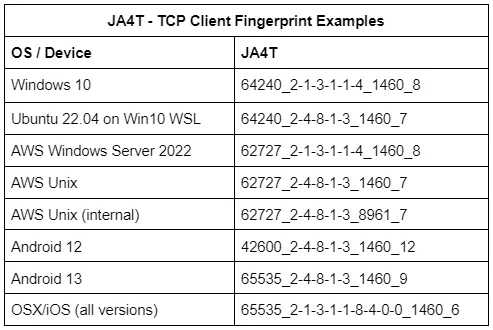
<p><a href="../assets/img/2024-04-23/examples.webp" data-lightbox="/assets/img/2024-04-23/examples.webp" data-title="JA4T Examples"><img src="../assets/img/2024-04-23/examples.webp" alt="" class="mx-auto" style="" /></a></p>

<p>Each operating system has different combinations of window size, options, and window scale. For example, Microsoft Windows does not utilize TCP Option 8 (timestamp), whereas all Unix-based operating systems do. iOS ends with a TCP Option 0 (End of list) whereas other operating systems do not. It’s interesting that iOS added another Option 0 to make their options list evenly divisible by 4 rather than removing an NOP (Option 1). This goes back to decisions the programmers made when building the netcode.</p>

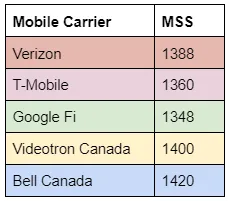
<p>Changes in the MSS (part <em>c</em>), can help identify network conditions for the device. For example, each mobile carrier sets a different MSS for the overhead in their cell network:</p>

<p><a href="../assets/img/2024-04-23/mobilecarriers.webp" data-lightbox="/assets/img/2024-04-23/mobilecarriers.webp" data-title="Mobile Carrier MSSs"><img src="../assets/img/2024-04-23/mobilecarriers.webp" alt="" class="mx-auto" style="" /></a></p>

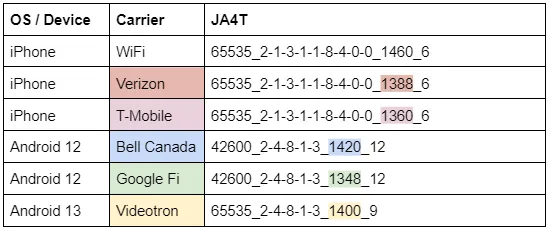
<p>Which means we can identify the carrier that devices are on:</p>

<p><a href="../assets/img/2024-04-23/mobilecarriersja4ts.webp" data-lightbox="/assets/img/2024-04-23/mobilecarriersja4ts.webp" data-title="Mobile Carrier JA4Ts"><img src="../assets/img/2024-04-23/mobilecarriersja4ts.webp" alt="" class="mx-auto" style="" /></a></p>

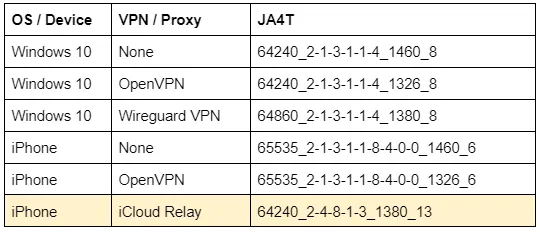
<p>When a device is connected through a VPN, the MSS, and occasionally Window Size, are <a href="https://www.cloudflare.com/learning/network-layer/what-is-mss/">changed</a> based on the overhead of the VPN and encryption ciphers used. When a device is connected through a Proxy, the TCP fingerprint of the proxy is seen on the server side, not the client. For example, the complete change in fingerprint when an iPhone connects through iCloud Relay:</p>

<p><a href="../assets/img/2024-04-23/vpnja4ts.webp" data-lightbox="/assets/img/2024-04-23/vpnja4ts.webp" data-title="VPN JA4Ts"><img src="../assets/img/2024-04-23/vpnja4ts.webp" alt="" class="mx-auto" style="" /></a></p>

<h2 id="ja4ts-tcp-server-response-fingerprint">JA4TS: TCP Server Response Fingerprint</h2>

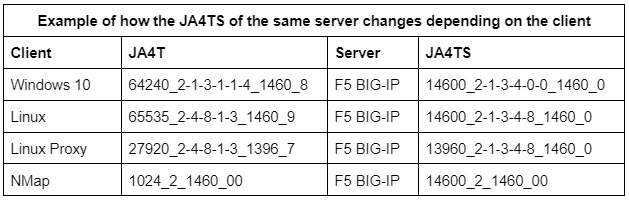
<p>While JA4T is based on the client’s TCP SYN packet, JA4TS is based on the SYN-ACK response.</p>

<p>TCP servers may respond to different client TCP SYN options differently. This means that any given server may produce multiple JA4TS fingerprints depending on the clients connecting to it. For example, if a client does not include TCP Option 4 (SACK), the server is not likely to include Option 4 in its SYN-ACK response. Thus making JA4TS a TCP Server <em>Response</em> Fingerprint. To get an accurate fingerprint of the Server itself, see JA4TScan in the section below.</p>

<p><a href="../assets/img/2024-04-23/clientdependentja4ts.webp" data-lightbox="/assets/img/2024-04-23/clientdependentja4ts.webp" data-title="Client dependency of JA4TS"><img src="../assets/img/2024-04-23/clientdependentja4ts.webp" alt="" class="mx-auto" style="" /></a></p>

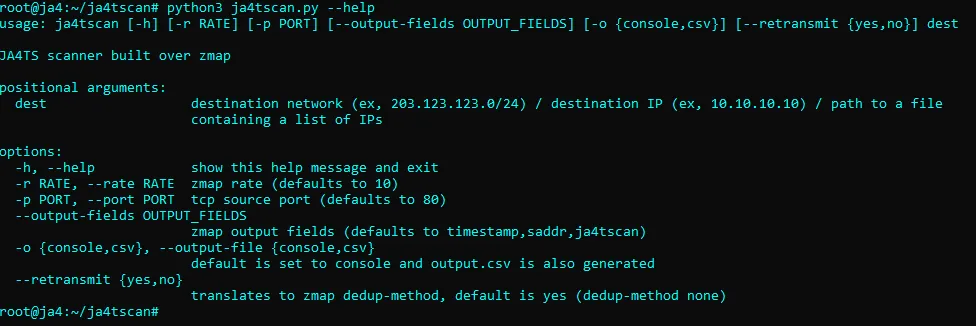
<h2 id="ja4tscan-active-tcp-server-fingerprinting">JA4TScan: Active TCP Server Fingerprinting</h2>

<p><a href="../assets/img/2024-04-23/ja4tscan.webp" data-lightbox="/assets/img/2024-04-23/ja4tscan.webp" data-title="JA4TScan"><img src="../assets/img/2024-04-23/ja4tscan.webp" alt="" class="mx-auto" style="" /></a></p>

<p>JA4TScan is designed to produce a reliable TCP fingerprint of any server. It does this by actively scanning servers with a single SYN packet that includes all common TCP options to produce the most robust TCP SYN-ACK response from the server. It does not respond to the SYN-ACK from the server, but instead listens for retransmissions, counts the delay between each retransmission, and adds those delays to the end of the fingerprint as section <em>e</em>. If an RST packet is observed, it is also added to the fingerprint and prefixed with an “R”.</p>

<p><a href="../assets/img/2024-04-23/wiresharkja4tscan.webp" data-lightbox="/assets/img/2024-04-23/wiresharkja4tscan.webp" data-title="JA4TScan as seen in Wireshark"><img src="../assets/img/2024-04-23/wiresharkja4tscan.webp" alt="" class="mx-auto" style="" /></a></p>
<figcaption class="text-center">JA4TScan as seen in Wireshark</figcaption>

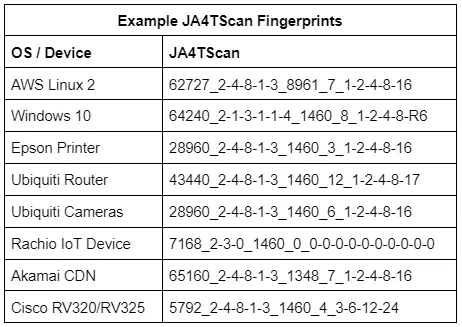
<p>TCP retransmissions, the number of retransmissions, and the delay between them are unique per operating system, as they are based on the OS netcode and the decisions of the engineers who wrote it. For example, some IoT devices send several retransmissions less than a second apart to attempt to reconnect as quickly as possible, while other devices will wait one second, retransmit, then wait two seconds, retransmit, then wait four seconds, retransmit, etc.</p>

<p><a href="../assets/img/2024-04-23/exampleja4tscans.webp" data-lightbox="/assets/img/2024-04-23/exampleja4tscans.webp" data-title="Example JA4TScan fingerprints"><img src="../assets/img/2024-04-23/exampleja4tscans.webp" alt="" class="mx-auto" style="" /></a></p>

<p>By incorporating the delay between TCP retransmission responses, we can build a very robust TCP fingerprint with only a single SYN packet. JA4TScan will be added to <a href="https://censys.com/">Censys</a> and other tools later this year.</p>

<p>JA4TScan is available as a stand-alone tool here: <a href="https://github.com/FoxIO-LLC/ja4tscan">https://github.com/FoxIO-LLC/ja4tscan</a></p>

<h2 id="blocking-internet-scanners-with-ja4t-and-greynoise">Blocking Internet Scanners with JA4T and GreyNoise</h2>

<p><a href="https://www.greynoise.io/">GreyNoise</a> is a service that turns Internet noise into intelligence. As such, they can correlate data, such as fingerprints, across internet scanners. Correlating JA4+ across GreyNoise allows for the grouping of threat actors and tools.</p>

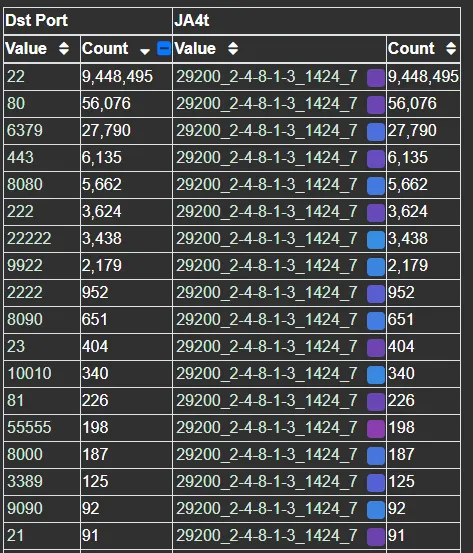
<p>For example, one of the top JA4T fingerprints observed on GreyNoise is <em>29200_2–4–8–1–3_1424_7</em>. An options list of <em>2–4–8–1–3</em> indicates a Unix-based operating system and an MSS of 1424 indicates that these connections have 36 bytes of additional network overhead. This is possibly an unencrypted tunnel or proxy, as 36 bytes is not enough for additional encryption as would be seen in a VPN. GreyNoise is observing hundreds of source IPs with this JA4T fingerprint, however, all are within Tencent IP ranges and listening on port 22, with some listening on port 31401, which is Pi Node Crypto Miner. Given the MSS discrepancy, it’s possible that these source IPs are not actually the true source of the traffic but instead that traffic is being bounced through them.</p>

<p>Pivoting on the JA4T with GreyNoise data, we can see this actor’s scanning priorities are primarily focused on SSH and alternative SSH ports:</p>

<p><a href="../assets/img/2024-04-23/scanningpriorities.webp" data-lightbox="/assets/img/2024-04-23/scanningpriorities.webp" data-title="Scanning priorities"><img src="../assets/img/2024-04-23/scanningpriorities.webp" alt="" class="mx-auto" style="" /></a></p>

<p>As this JA4T is unusual, it would be safe to block it when the destination port matches 22. However, there’s a potential for false positives in production applications over standard ports like 80 and 443. To block these, we can combine the JA4T with other JA4 fingerprints.</p>

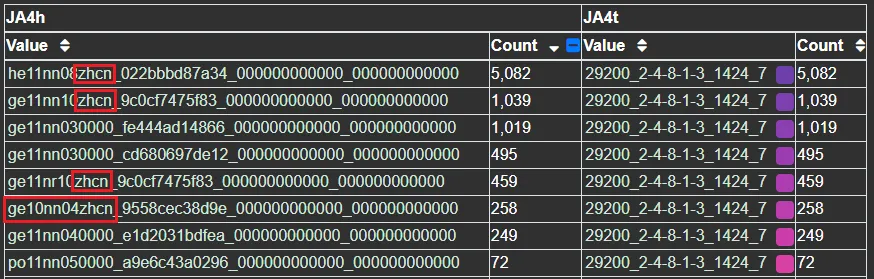
<p>Their second priority is web server identification. Comparing the top JA4H (HTTP Fingerprint) with this JA4T shows that they use a few different bots. Some are simple, while others try to look like a browser with their primary Accept-Language set to “zhcn”, which is Chinese-PRC. In the case of <em>ge10nn04zhcn</em>, they’re using HTTP 1.0 as an attempt to connect to older devices:</p>

<p><a href="../assets/img/2024-04-23/ja4hja4t.webp" data-lightbox="/assets/img/2024-04-23/ja4hja4t.webp" data-title="JA4H and JA4T fingerprints"><img src="../assets/img/2024-04-23/ja4hja4t.webp" alt="" class="mx-auto" style="" /></a></p>

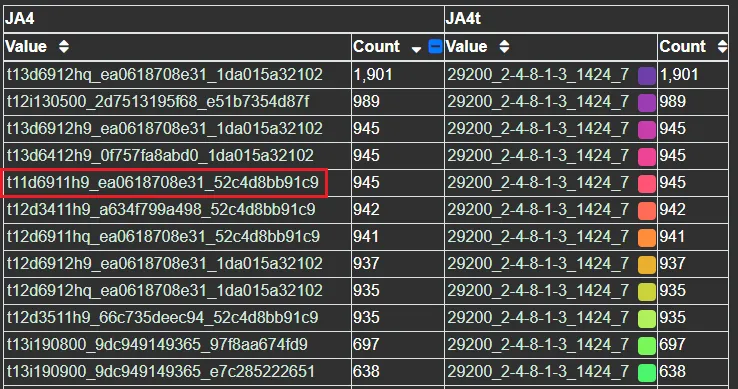
<p>Comparing the top JA4 (TLS Fingerprint) with this JA4T reveals that the actor uses a few variations of client hellos when scanning. Their primary scanner is a custom catch-all scanner that supports TLS 1.3, but, also, 69 ciphers — nice. Their other scanners support TLS 1.2 and 1.1, indicating that they’re looking to connect to both new and old systems with a variety of TLS client hellos. The one JA4 of <em>t11d6911h9</em> is particularly odd because it’s TLS 1.1 with an ALPN extension, but ALPN didn’t exist in the days of TLS 1.1:</p>

<p><a href="../assets/img/2024-04-23/ja4ja4t.webp" data-lightbox="/assets/img/2024-04-23/ja4ja4t.webp" data-title="JA4 and JA4T fingerprints"><img src="../assets/img/2024-04-23/ja4ja4t.webp" alt="" class="mx-auto" style="" /></a></p>

<p>Combining this actor’s unusual JA4T with these unusual JA4H or JA4 fingerprints would make for great blocking or detection rules as it is the combination of JA4+ fingerprints that can facilitate creating detection and blocking rules with no false positives.</p>

<p>I want to thank GreyNoise, F5, and Arkime for their support of JA4+ in these investigations!</p>

<h2 id="conclusion">Conclusion</h2>

<p>JA4T, JA4TS, and JA4TScan are the latest additions to the JA4+ suite of network fingerprints. These tools add the ability to fingerprint client and server operating systems, devices, particular applications, hosting/provider characteristics, detect if a connection is going through a tunnel, VPN or proxy, and help troubleshoot network issues. If built into a WAF, firewall, or load balancer, it becomes possible to block unwanted traffic based on fingerprints rather than a list of constantly-changing IP addresses.</p>

<p>You can find JA4+ on our GitHub (<a href="https://github.com/FoxIO-LLC/ja4">https://github.com/FoxIO-LLC/ja4</a>) and in many cyber security products.</p>

<p>JA4TScan is available as a stand alone tool here: <a href="https://github.com/FoxIO-LLC/ja4tscan">https://github.com/FoxIO-LLC/ja4tscan</a></p>

<p>F5 iRules for JA4+ along with an example of blocking traffic with JA4T are available here: <a href="https://github.com/f5devcentral/f5-ja4">https://github.com/f5devcentral/f5-ja4</a></p>

<p>JA4+ licensing details are <a href="https://github.com/FoxIO-LLC/ja4/tree/main#licensing">here</a>.</p>

<p>JA4T/S/Scan was created at <a href="https://foxio.io/">FoxIO</a> by <a href="https://www.linkedin.com/in/johnalthouse/">John Althouse</a>.</p>

<p>With valuable feedback from:<br />
Charles Smutz<br />
Andy Wick<br />
Joe Martin<br />
Andrew Morris<br />
Reid Huyssen<br />
Tony Maszeroski<br />
Greg Lesnewich<br />
Jo Johnson<br />
Timothy Noel<br />
Gary Lipsky</p>

<p>And engineers working at AWS, F5, GreyNoise, Hunt, Censys, and others.</p>]]></content><author><name>John Althouse</name></author><summary type="html"><![CDATA[And How to Use It to Block Over 80% of Internet Scan Traffic]]></summary><media:thumbnail xmlns:media="http://search.yahoo.com/mrss/" url="http://blog.foxio.io/assets/img/2024-04-23/tcp.gif" /><media:content medium="image" url="http://blog.foxio.io/assets/img/2024-04-23/tcp.gif" xmlns:media="http://search.yahoo.com/mrss/" /></entry><entry><title type="html">JA4+ Network Fingerprinting</title><link href="http://blog.foxio.io/ja4+-network-fingerprinting" rel="alternate" type="text/html" title="JA4+ Network Fingerprinting" /><published>2023-09-26T00:00:00+00:00</published><updated>2023-09-26T00:00:00+00:00</updated><id>http://blog.foxio.io/ja4+-network-fingerprinting</id><content type="html" xml:base="http://blog.foxio.io/ja4+-network-fingerprinting"><![CDATA[<h2 id="tldr">TL;DR</h2>

<p>In this blog I go over the new JA4+ network fingerprinting methods and examples of what they can detect.</p>

<p>JA4+ provides a suite of modular network fingerprints that are easy to use and easy to share, replacing the JA3 TLS fingerprinting standard from 2017. These methods are both human and machine readable to facilitate more effective threat-hunting and analysis. The use-cases for these fingerprints include scanning for threat actors, malware detection, session hijacking prevention, compliance automation, location tracking, DDoS detection, grouping of threat actors, reverse shell detection, and many more.</p>

<p>JA4+ Fingerprints:</p>

<p><a href="../assets/img/2023-09-26/ja4plusfingerprints.webp" data-lightbox="/assets/img/2023-09-26/ja4plusfingerprints.webp" data-title="JA4+ Fingerprints"><img src="../assets/img/2023-09-26/ja4plusfingerprints.webp" alt="" class="mx-auto" style="" /></a></p>

<p>More fingerprints are in development and will be added to the JA4+ family as they are released.</p>

<p>UPDATE: Click here for the <a href="https://blog.foxio.io/ja4t-tcp-fingerprinting">JA4T/S/Scan — TCP Fingerprinting</a> blog.</p>

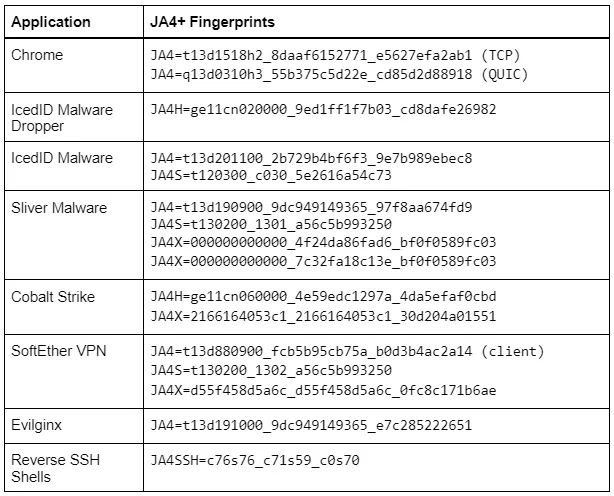
<p><strong>Examples:</strong></p>

<p><a href="../assets/img/2023-09-26/application_fingerprints_table.webp" data-lightbox="/assets/img/2023-09-26/application_fingerprints_table.webp" data-title="Application and fingerprints table"><img src="../assets/img/2023-09-26/application_fingerprints_table.webp" alt="" class="mx-auto" style="" /></a></p>

<p><a href="../assets/img/2023-09-26/ja4x_sliver_c2_list.webp" data-lightbox="/assets/img/2023-09-26/ja4x_sliver_c2_list.webp" data-title="JA4X Sliver C2 list"><img src="../assets/img/2023-09-26/ja4x_sliver_c2_list.webp" alt="" class="mx-auto" style="" /></a></p>

<p>JA4+ is available here: <a href="https://github.com/FoxIO-LLC/ja4">https://github.com/FoxIO-LLC/ja4</a></p>

<h2 id="what-is-ja4">What is JA4+</h2>

<p>JA4+ is a set of simple yet powerful network fingerprints for multiple protocols that are both human and machine readable, facilitating improved threat-hunting and security analysis. If you are unfamiliar with network fingerprinting, I encourage you to read my blogs releasing JA3 <a href="https://medium.com/salesforce-engineering/tls-fingerprinting-with-ja3-and-ja3s-247362855967">here</a>, JARM <a href="https://medium.com/salesforce-engineering/easily-identify-malicious-servers-on-the-internet-with-jarm-e095edac525a">here</a>, and this excellent blog by Fastly on the <a href="https://www.fastly.com/blog/the-state-of-tls-fingerprinting-whats-working-what-isnt-and-whats-next">State of TLS Fingerprinting</a> which outlines the history of the aforementioned along with their problems. JA4+ brings dedicated support, keeping the methods up-to-date as the industry changes. Additionally, and by popular demand, an official JA4+ database of fingerprints, associated applications and recommended detection logic is in the process of being built.</p>


<p>All JA4+ fingerprints have an <em>a_b_c</em> format, delimiting the different sections that make up the fingerprint. This allows for hunting and detection utilizing just <em>ab</em> or <em>ac</em> or <em>c</em> only. If one wanted to just do analysis on incoming cookies into their app, they would look at JA4H_c only. This new locality-preserving format facilitates deeper and richer analysis while remaining simple, easy to use, and allowing for extensibility.</p>

<p>In this blog we are releasing JA4/S/H/L/X/SSH, or JA4+ for short. More fingerprints are in development and will be added to the JA4+ family as they are released.</p>

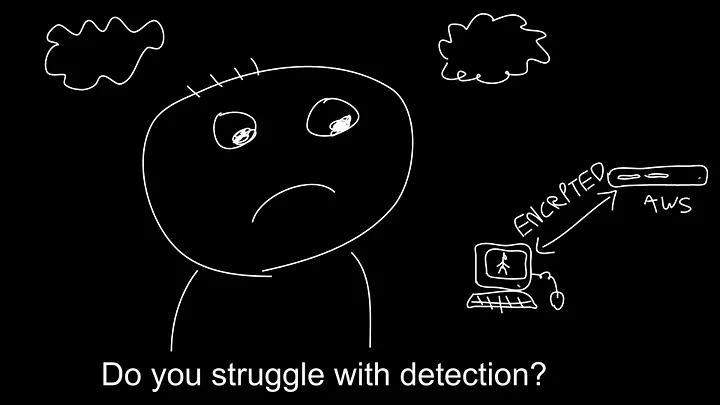
<p><a href="../assets/img/2023-09-26/do_you_struggle_with_detection.webp" data-lightbox="/assets/img/2023-09-26/do_you_struggle_with_detection.webp" data-title="There is hope!"><img src="../assets/img/2023-09-26/do_you_struggle_with_detection.webp" alt="" class="mx-auto" style="" /></a></p>
<figcaption class="text-center">There is hope!</figcaption>

<h2 id="ja4-tls-client-fingerprint">JA4: TLS Client Fingerprint</h2>

<p>TLS is used to encrypt the vast majority of traffic on the internet, from web browsing to streaming, to IoT usage analytics. Even malware uses TLS to hide its malicious communications. At the beginning of a TLS connection, the client sends a TLS Client Hello packet which is sent in the clear, prior to encrypted communication. This packet, generated by the client application, informs the server of what ciphers it supports as well as its preferred method of communication. As such, the TLS Client Hello packet is unique per application or its underlying TLS library.</p>

<p>JA4 looks at this TLS Client Hello packet and builds out an easily understandable and shareable fingerprint. The format is as follows:</p>

<p><a href="../assets/img/2023-09-26/ja4.webp" data-lightbox="/assets/img/2023-09-26/ja4.webp" data-title="JA4"><img src="../assets/img/2023-09-26/ja4.webp" alt="" class="mx-auto" style="" /></a></p>

<p>JA4 fingerprints the client, no matter if the traffic is over TCP or <a href="https://en.wikipedia.org/wiki/QUIC">QUIC</a>. QUIC is the protocol used by the new HTTP/3 standard that encapsulates TLS 1.3 into UDP packets. As QUIC was developed by Google, if an organization heavily utilizes Google products, QUIC could make up half of their network traffic, so this is important to capture.</p>

<p>JA4 also clearly shows the ALPN (Application-Layer Protocol Negotiation). This represents the protocol that the application wants to communicate in after the TLS negotiation is complete. “h2” = HTTP/2, “h1” = HTTP/1.1, “dt” = DNS-over-TLS, etc. A full list of possible ALPNs can be found <a href="https://www.iana.org/assignments/tls-extensiontype-values/tls-extensiontype-values.xhtml">here</a>. A “00” here denotes the lack of ALPN. Note that the presence of ALPN “h2” does not indicate a browser as many IoT devices communicate over HTTP/2. However, the lack of an ALPN may indicate that the client is not a web browser.</p>

<p>More technical details for implementation and what the raw (unhashed) fingerprint looks like can be found on the <a href="https://github.com/FoxIO-LLC/ja4">github page</a>.</p>

<p><a href="../assets/img/2023-09-26/examples.webp" data-lightbox="/assets/img/2023-09-26/examples.webp" data-title="Examples"><img src="../assets/img/2023-09-26/examples.webp" alt="" class="mx-auto" style="" /></a></p>
<figcaption class="text-center">Examples</figcaption>

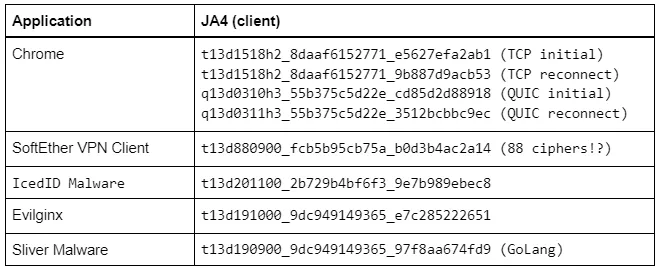
<p>Even though the traffic is encrypted over TLS 1.3, we are still able to gain a huge amount of valuable information about the client application. Remember that most custom applications will have the fingerprint of their underlying TLS libraries. So a program written in Go will likely have a JA4 that matches other Go programs. The same is true for Python, Java, etc., while custom programs like VPN clients, Steam, Slack, and Windows functions will be unique.</p>

<p>JA4 can be extremely valuable in production networks where applications are largely static. If you are running an all Linux infrastructure, then a Windows JA4 fingerprint would be worth looking into. If you’re running only Exchange servers, then a sudden python JA4 fingerprint would be worth looking into. JA4 makes for a great pivot point in analysis when trying to understand network traffic and the a_b_c format allows for deeper analysis.</p>

<p>For example; <a href="http://greynoise.io">GreyNoise</a> is an internet listener that identifies internet scanners and is implementing JA4+ into their product. They have an actor who scans the internet with a constantly changing single TLS cipher. This generates a massive amount of completely different JA3 fingerprints but with JA4, only the <em>b</em> part of the JA4 fingerprint changes, parts <em>a</em> and <em>c</em> remain the same. As such, GreyNoise can track the actor by looking at the JA4_ac fingerprint (joining <em>a+c</em>, dropping <em>b</em>).</p>

<h2 id="ja4s-tls-serversession-fingerprint">JA4S: TLS Server/Session Fingerprint</h2>


<p>After a client sends its TLS Client Hello packet, the server will respond with its TLS Server Hello packet. This packet, also sent in the clear, is formulated based on the server’s selection of available options in the Client Hello. This includes the one cipher chosen out of the list of available options, and any extensions the server wishes to set.</p>

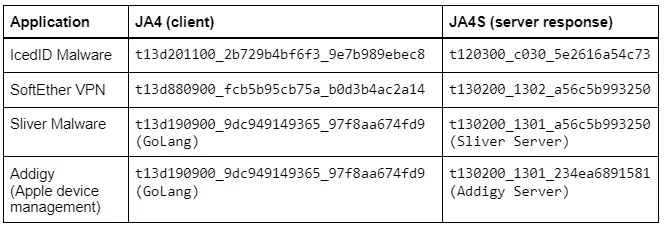
<p>As such, the Server Hello is unique to both the server application and the Client Hello that was sent to it. A different Client Hello may cause a different Server Hello, and therefore a different JA4S, from the same server. However, the same Client Hello will always produce the same Server Hello from that server application. For example if the client sends JA4=a_b_c and the server responds with JA4S=d_b_e, that server will always respond to a_b_c with d_b_e. But if another application sends a different client hello to that same server, say JA4=x_y_z, the server will respond with a different server hello, JA4S=t_y_v. So it’s a different response to different applications but always the same response to the same application. I go into more detail on this in my <a href="https://engineering.salesforce.com/tls-fingerprinting-with-ja3-and-ja3s-247362855967/">JA3S blog post</a>.</p>

<p><a href="../assets/img/2023-09-26/ja4s.webp" data-lightbox="/assets/img/2023-09-26/ja4s.webp" data-title="JA4S"><img src="../assets/img/2023-09-26/ja4s.webp" alt="" class="mx-auto" style="" /></a></p>

<p><a href="../assets/img/2023-09-26/example_ja4_and_ja4s_combinations.webp" data-lightbox="/assets/img/2023-09-26/example_ja4_and_ja4s_combinations.webp" data-title="Example JA4 and JA4S combinations"><img src="../assets/img/2023-09-26/example_ja4_and_ja4s_combinations.webp" alt="" class="mx-auto" style="" /></a></p>
<figcaption class="text-center">Example JA4 and JA4S combinations</figcaption>

<p>JA4S, when combined with JA4, significantly increases detection fidelity. Going from merely identifying underlying libraries of a client to <strong>identifying the client or malware family</strong>. Beyond application identification, one could look at just JA4S_b to understand what ciphers are being used on any given network to ensure it is meeting compliance requirements. All of this is possible without breaking encryption.</p>

<h2 id="ja4h-http-client-fingerprint">JA4H: HTTP Client Fingerprint</h2>


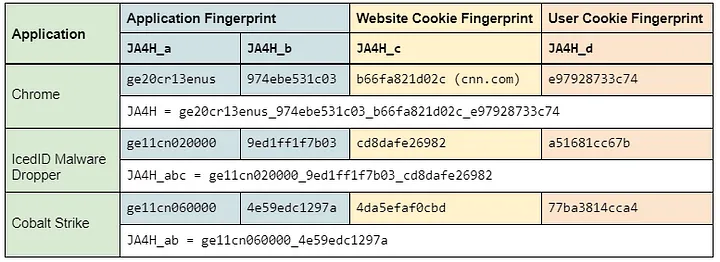
<p>JA4H fingerprints the HTTP client based on each HTTP request. As most traffic is encrypted, JA4H is best utilized on servers, proxies, WAFs, TLS terminating load balancers, and environments where TLS is decrypted. However, JA4H is still valuable even in environments where TLS is not decrypted because a lot of devices and programs, including malware, still communicate over HTTP. The IcedID malware dropper, for example, doesn’t use TLS. These malware programs are very easy to fingerprint.</p>

<p><a href="../assets/img/2023-09-26/ja4h.webp" data-lightbox="/assets/img/2023-09-26/ja4h.webp" data-title="JA4H"><img src="../assets/img/2023-09-26/ja4h.webp" alt="" class="mx-auto" style="" /></a></p>

<p>JA4H_ab are a fingerprint of the application for the given HTTP method used. The lack of an Accept-Language is a clear indication that the application is not human interactive, ergo a bot.</p>

<p>JA4H_c is a fingerprint of the cookie and will be different for each website visited but will be the same for that website or application. For example, every Plex server or Okta server will produce the same JA4H_c.</p>

<p>JA4H_d is a fingerprint of the user and will be different per user. This allows for tracking of a user through a website without logging SPII, thereby keeping the logging system GDPR compliant.</p>

<p>More details on the technical implementation can be found on our <a href="https://github.com/FoxIO-LLC/ja4">github</a>.</p>

<p><a href="../assets/img/2023-09-26/ja4h_examples.webp" data-lightbox="/assets/img/2023-09-26/ja4h_examples.webp" data-title="JA4H Examples"><img src="../assets/img/2023-09-26/ja4h_examples.webp" alt="" class="mx-auto" style="" /></a></p>
<figcaption class="text-center">JA4H Examples</figcaption>

<p>On the server side, one could use JA4H_c as a hunting method. As the server is specifying which cookie fields the client should use, all clients should have the same JA4H_c. Discrepancies here merit looking into. One could also track a user with JA4H_d and their client application with JA4H_ab or identify bots with just JA4H_ab.</p>

<p>On the client side (proxy, NDR, zero trust), JA4H combined with JA4 and JA4S allow for extremely high fidelity application and malware detection.</p>

<p>There are a lot of use cases for JA4H, especially when combined with the rest of JA4+. I’ll cover all of them in more detail in a later blog post.</p>

<h2 id="ja4l-light-distance-locality">JA4L: Light Distance Locality</h2>


<p>JA4L measures the distance between a client and a server by looking at the latency between the first few packets in a connection. We use the first few packets because these are low-level machine generated, so there is nearly zero processing delay in creating and sending these packets. Time is measured in microseconds (µs), 1ms = 1000µs, as microseconds are a standard unit of time measurement in packet captures.</p>

<p>If JA4L is running server side, this will measure the distance of the client from the server and if this is running client side, this will measure the distance of the server from the client. If this is running on a network tap, it will measure the distance of each from the network tap location.</p>

<p><a href="../assets/img/2023-09-26/ja4l.webp" data-lightbox="/assets/img/2023-09-26/ja4l.webp" data-title="JA4L"><img src="../assets/img/2023-09-26/ja4l.webp" alt="" class="mx-auto" style="" /></a></p>

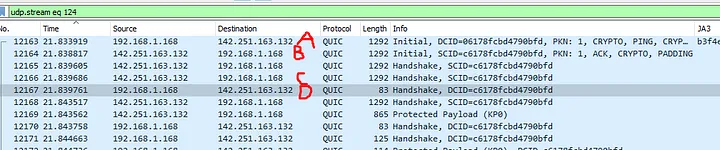
<p>JA4L is split up into 2 measurements, client and server. For TCP, these are determined by looking at the TCP 3-way handshake. UDP, we’re looking at the QUIC handshake.</p>

<p><a href="../assets/img/2023-09-26/tcp.webp" data-lightbox="/assets/img/2023-09-26/tcp.webp" data-title="TCP"><img src="../assets/img/2023-09-26/tcp.webp" alt="" class="mx-auto" style="" /></a></p>
<figcaption class="text-center">TCP</figcaption>

<p><strong>JA4L-C</strong> = {(C-B)/2}_Client TTL<br />
<strong>JA4L-S</strong> = {(B-A)/2}_Server TTL</p>

<p>In the above example:<br />
<strong>JA4L-C</strong> = 11_128<br />
<strong>JA4L-S</strong> = 1759_42</p>

<p><a href="../assets/img/2023-09-26/quic.webp" data-lightbox="/assets/img/2023-09-26/quic.webp" data-title="QUIC"><img src="../assets/img/2023-09-26/quic.webp" alt="" class="mx-auto" style="" /></a></p>
<figcaption class="text-center">QUIC</figcaption>

<p><strong>JA4L-C</strong> = {(D-C)/2}_Client TTL<br />
<strong>JA4L-S</strong> = {(B-A)/2}_Server TTL</p>

<p>In the above example:<br />
<strong>JA4L-C</strong> = 37_128<br />
<strong>JA4L-S</strong> = 2449_42\</p>

<p><strong>Distance Measurement</strong>:<br />
With JA4L we can determine the distance between the client and server using this formula:</p>

<p>D = <em>jc/p</em></p>

<p>D = Distance<br />
j = JA4L_a<br />
c = Speed of light per µs in fiber (0.128 miles/µs or 0.206km/µs)<br />
p = Propagation delay factor</p>

<p>Typical propagation delay depends on terrain and how many networks are involved.</p>

<p>Poor terrain factor = 2 (around mountains, water)<br />
Good terrain factor = 1.5 (along highway, under sea cables)<br />
SpaceX factor = … needs to be tested</p>

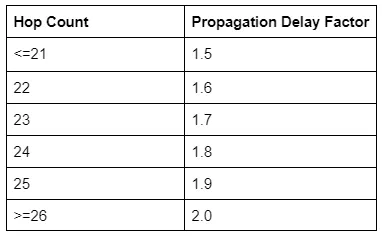
<p>We can use the TTL to calculate the hop count, which can help inform the propagation delay factor. (The table below is a good starting point but more testing needs to be done.)</p>

<p><a href="../assets/img/2023-09-26/hop_counts.webp" data-lightbox="/assets/img/2023-09-26/hop_counts.webp" data-title="Hop counts"><img src="../assets/img/2023-09-26/hop_counts.webp" alt="" class="mx-auto" style="" /></a></p>

<p>To calculate the number of hops a connection went through, subtract the TTL from its estimated initial TTL.</p>

<p>Cisco, F5, most networking devices use a TTL of 255<br />
Windows uses a TTL of 128<br />
Mac, Linux, phones, and IoT devices use a TTL of 64</p>

<p>Most routes on the Internet have less than 64 hops. Therefore if the observed TTL, JA4L_b, is &lt;64, the estimated initial TTL is 64. Within 65–128, the estimated initial TTL is 128. And if the TTL is &gt;128 then the estimated initial TTL is 255.</p>

<p>With a JA4L-S of 2449_42, the observed TTL of 42 means the initial TTL was likely 64, a Linux server. 64-42 gives us a hop count of 22.</p>

<p>2449x0.128/1.6=195</p>

<p>We can conclude that this server is within 195 miles of the client. The server may be closer than this, but it is physically impossible for it to be farther away as the speed of light is constant. If there are multiple JA4Ls for the same host, the lowest value should be taken as the most accurate.</p>

<p>In this example, the actual distance was 194 miles.</p>

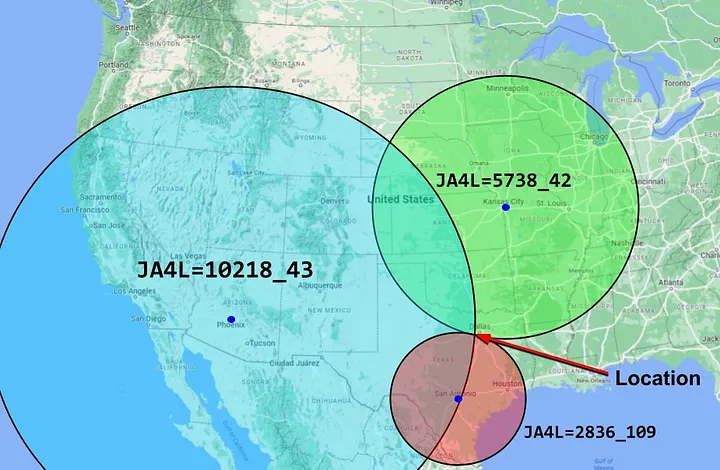
<p>Utilizing multiple locations, one can passively triangulate the physical location of any client or server down to a city area. More on this in a later blog post…</p>

<p><a href="../assets/img/2023-09-26/ja4l_triangulation.webp" data-lightbox="/assets/img/2023-09-26/ja4l_triangulation.webp" data-title="JA4L triangulation"><img src="../assets/img/2023-09-26/ja4l_triangulation.webp" alt="" class="mx-auto" style="" /></a></p>

<p>Additionally, JA4L_b (TTL) passively facilitates the identification of source operating systems which is an excellent data point to have when performing forensic analysis. Also, because JA4L is looking at Layer 3 data, it works on encrypted and unencrypted traffic.</p>

<p>Combining JA4 with JA4H and JA4L on the server side makes it possible for the server application to identify session hijacking or MiTM attacks. If a session cookie (JA4H_d) were to suddenly change locations, operating systems (JA4L), and application (JA4 and JA4H_ab), then it would make sense to revoke the session token, asking the user to log back in with MFA. With this type of logic, special care should be taken to not allowlist particular fingerprints as applications will change over time, but instead to look for dramatic changes. Session hijacking detection with JA4+ is something <a href="https://darksail.ai">darksail.ai</a> is working on right now.</p>

<h2 id="ja4x-x509-tls-certificate-fingerprinting">JA4X: X509 TLS Certificate Fingerprinting</h2>

<p><strong>Credit: W.</strong></p>


<p>JA4X fingerprints the way in which TLS certificates are generated — not the values within the certificate. This can identify applications and settings used to create the certificate which can be extremely useful in threat hunting as threat actors will create different certificates but tend to use the same methods to create said certificates, thereby having the same JA4X fingerprint.</p>

<p><a href="../assets/img/2023-09-26/ja4x.webp" data-lightbox="/assets/img/2023-09-26/ja4x.webp" data-title="JA4X"><img src="../assets/img/2023-09-26/ja4x.webp" alt="" class="mx-auto" style="" /></a></p>

<p><a href="../assets/img/2023-09-26/ja4x_examples.webp" data-lightbox="/assets/img/2023-09-26/ja4x_examples.webp" data-title="JA4X Examples"><img src="../assets/img/2023-09-26/ja4x_examples.webp" alt="" class="mx-auto" style="" /></a></p>

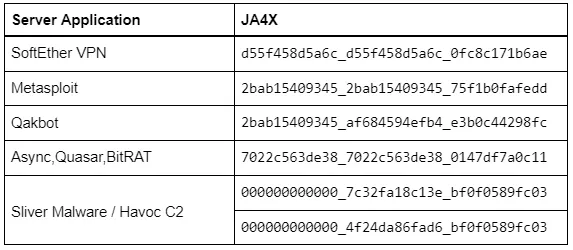
<p>SoftEther VPN was heavily utilized by Chinese APT actors, <a href="https://www.microsoft.com/en-us/security/blog/2023/08/24/flax-typhoon-using-legitimate-software-to-quietly-access-taiwanese-organizations/">Flax Typhoon</a>, to compromise Taiwan infrastructure, and <a href="https://www.microsoft.com/en-us/security/blog/2023/07/14/analysis-of-storm-0558-techniques-for-unauthorized-email-access/">Storm-0558</a> in the hacking of US Government Email accounts. According to Microsoft, it is very difficult to differentiate these connections from legitimate HTTPS traffic. However, because of the programmatic way that SoftEther generates its certificates, the JA4X is unique to SoftEther. If JA4X were to be implemented into a firewall, blocking traffic <em>to</em> SoftEther VPNs would be trivial. And by utilizing a JA4X feed, blocking inbound traffic <em>from</em> SoftEther VPNs would be trivial as well.</p>

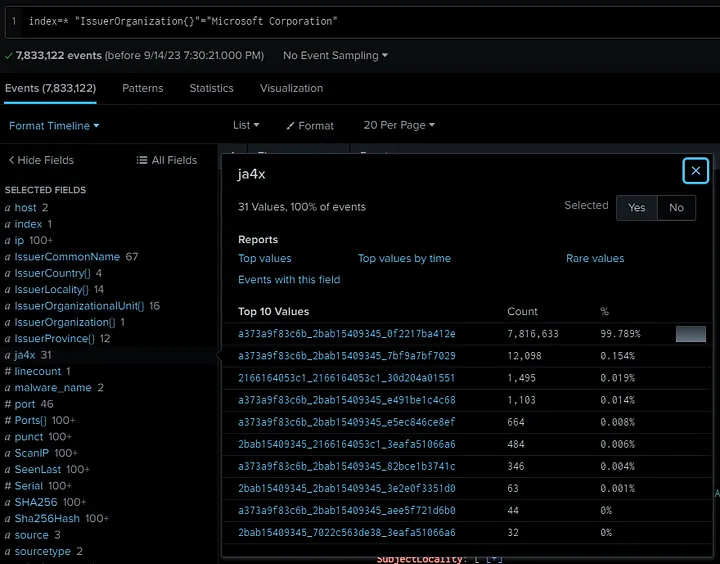
<p>Most certificate issuing organizations will use the same underlying program to generate and sign all of their certificates. Using Internet scan data enriched with JA4X from our friends at <a href="https://hunt.io/">Hunt.io</a>, we can take a look at Issuer Organization = “Microsoft Corporation” as an example.</p>

<p><a href="../assets/img/2023-09-26/ja4x_splunk.webp" data-lightbox="/assets/img/2023-09-26/ja4x_splunk.webp" data-title="JA4X Splunk"><img src="../assets/img/2023-09-26/ja4x_splunk.webp" alt="" class="mx-auto" style="" /></a></p>

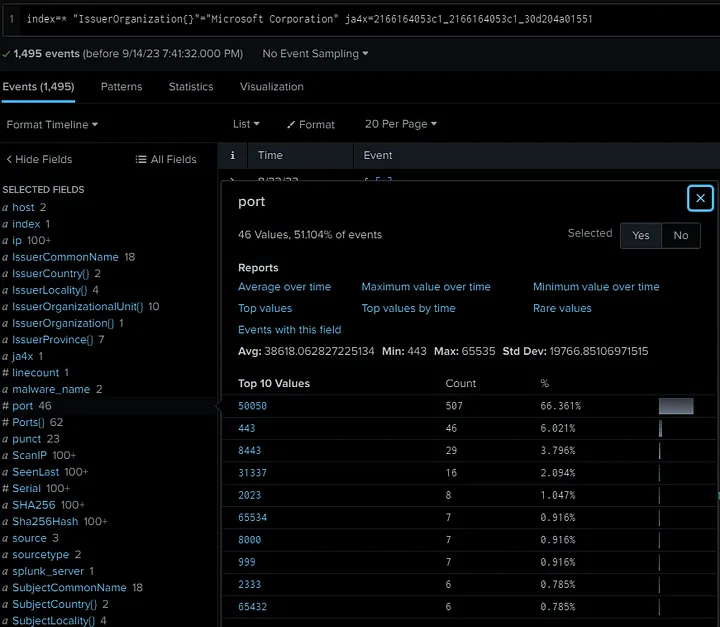
<p>You can see that 99.8% of observed certificates have the same JA4X. The next one down is very similar, but the third one looks completely different. Let’s pivot on this anomaly.</p>

<p><a href="../assets/img/2023-09-26/ja4x_splunk_2.webp" data-lightbox="/assets/img/2023-09-26/ja4x_splunk_2.webp" data-title="JA4X Splunk 2"><img src="../assets/img/2023-09-26/ja4x_splunk_2.webp" alt="" class="mx-auto" style="" /></a></p>

<p>Oh look, it’s all Cobalt Strike! Well, that was easy.</p>

<p>Hunting with JA4X on Internet scan data is extremely powerful because rather than looking at the values within a certificate, which, in the case of malware, are usually randomly generated, JA4X looks at <em>how</em> the certificate was generated.</p>

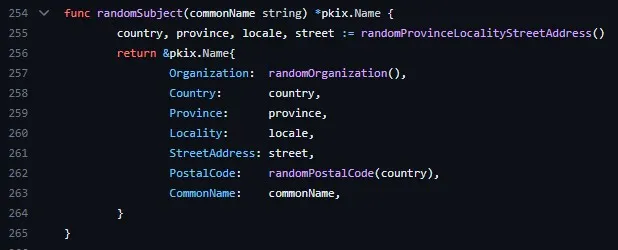
<p>One final example is <a href="https://github.com/BishopFox/sliver">Sliver C2</a>, which is a newer pentesting framework that is replacing Cobalt Strike in popularity. Like most good pentesting frameworks, Sliver is also heavily utilized by threat actors as it is designed to be difficult to detect.</p>

<p>Sliver has over 400 lines of code dedicated to randomly generating TLS certificates. As such, each certificate is unique and pivoting on a certificate hash will yield no results.</p>

<p><a href="../assets/img/2023-09-26/sliver_random_code.webp" data-lightbox="/assets/img/2023-09-26/sliver_random_code.webp" data-title="Sliver random code"><img src="../assets/img/2023-09-26/sliver_random_code.webp" alt="" class="mx-auto" style="" /></a></p>

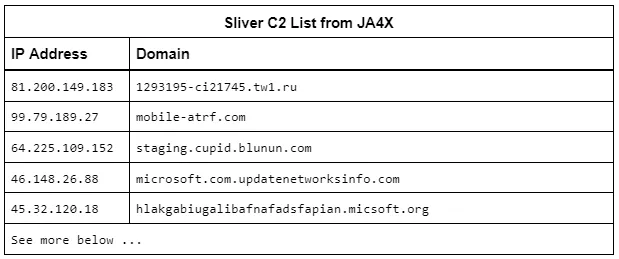
<p>However, each certificate is also generated by the same application and therefore has the same JA4X. <a href="https://github.com/HavocFramework/Havoc">Havoc C2</a> uses most of the Sliver code so it too has the same JA4X, but can be differentiated by looking at the Org Name and Postal Code length. In either case, both are malware and the JA4X is unique on the Internet. <strong>Our friends at</strong> <a href="https://driftnet.io/"><strong>driftnet.io</strong></a> <strong>offer a JA4X feed and, with it, were able to quickly identify all default Sliver C2s listening on the Internet.</strong></p>

<p><a href="../assets/img/2023-09-26/ja4x_sliver_c2_list.webp" data-lightbox="/assets/img/2023-09-26/ja4x_sliver_c2_list.webp" data-title="JA4X Sliver C2 list"><img src="../assets/img/2023-09-26/ja4x_sliver_c2_list.webp" alt="" class="mx-auto" style="" /></a></p>

<p>These examples show how JA4X can be used to detect and block traffic to SoftEther, Tor, Metasploit, Sliver, Havoc, RAT C2s, etc. Note that TLS certificates are sent in the clear in TLS 1.2, but are encrypted in TLS 1.3 so JA4X is best utilized on Proxy servers, Firewalls, MDR, NDR and Zero Trust applications that have that level of inspection. JA4X, when combined with JA4, JA4S, JA4H and JA4L provides an unparalleled level of visibility and detection capability. When used in internet scanning, JA4X is an excellent tool for pivot analysis and hunting down malicious servers, especially when combined with JARM data.</p>

<h2 id="ja4ssh-ssh-traffic-fingerprinting">JA4SSH: SSH Traffic Fingerprinting</h2>


<p>JA4SSH fingerprints SSH sessions by looking at SSH packets and providing a small, simple, easy-to-read fingerprint of the session on a configurable rolling basis, every 200 packets by default. With this, we are able to determine what is happening within the SSH connection, even though the traffic is encrypted, and provide an analyst with a simple set of fingerprints for their analysis.</p>

<p>Note that JA4SSH fingerprints the SSH session, not the SSH applications. For SSH application fingerprinting, I recommend you take a look at <a href="https://engineering.salesforce.com/open-sourcing-hassh-abed3ae5044c/">HASSH</a>, by my good friend <a href="https://www.linkedin.com/in/benjaminreardon/">Ben Reardon</a>.</p>

<p><a href="../assets/img/2023-09-26/ja4ssh.webp" data-lightbox="/assets/img/2023-09-26/ja4ssh.webp" data-title="JA4SSH"><img src="../assets/img/2023-09-26/ja4ssh.webp" alt="" class="mx-auto" style="" /></a></p>

<p><a href="../assets/img/2023-09-26/ja4ssh_examples.webp" data-lightbox="/assets/img/2023-09-26/ja4ssh_examples.webp" data-title="Examples"><img src="../assets/img/2023-09-26/ja4ssh_examples.webp" alt="" class="mx-auto" style="" /></a></p>
<figcaption class="text-center">Examples</figcaption>

<p>To understand how SSH traffic works and how to identify tunnels using traffic analysis, I recommend you read these excellent blogs on the subject by Trisul.org <a href="https://www.trisul.org/blog/traffic-analysis-of-secure-shell-ssh/">here</a> and <a href="https://www.trisul.org/blog/detecting-ssh-tunnels/">here</a>.</p>

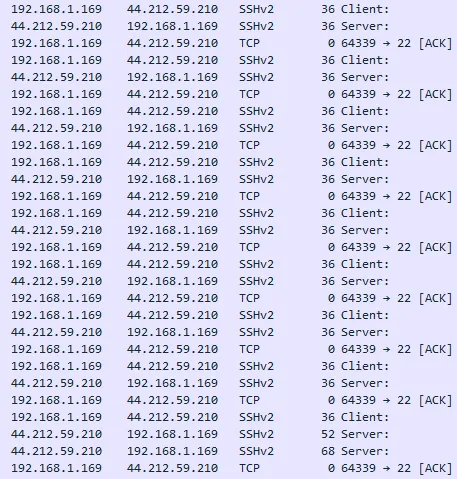
<p>In short, SSH packets are padded out to a particular length depending on the cipher algorithm and HMAC used. With chacha20-poly1305, that ends up being 36 bytes. When the client types a character into the ssh terminal, that character is encrypted with the packet padded to 36 bytes and then sent to the server. The server will respond with the same character in a 36 byte packet and that’s when the character is displayed in the terminal window. The client will then send a TCP ACK packet to tell the server that they’re done with the previous transaction. Because of this, a client typing in a terminal will look like this:</p>

<p><a href="../assets/img/2023-09-26/terminal_view.webp" data-lightbox="/assets/img/2023-09-26/terminal_view.webp" data-title="Terminal view"><img src="../assets/img/2023-09-26/terminal_view.webp" alt="" class="mx-auto" style="" /></a></p>

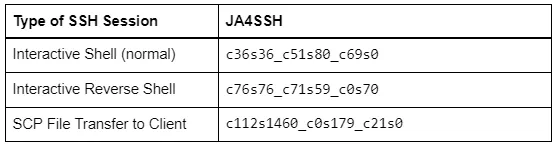
<p>Notice that the TCP ACKs are coming from the side doing the SSH requests (client) and the server returns the output of the command at the bottom. The JA4SSH for this looks like: c36s36_c51s80_c69s0. So you see 36/36 and all the ACKs are from the client, the server has sent none, so from these we can easily see that it is an interactive forward SSH session.</p>

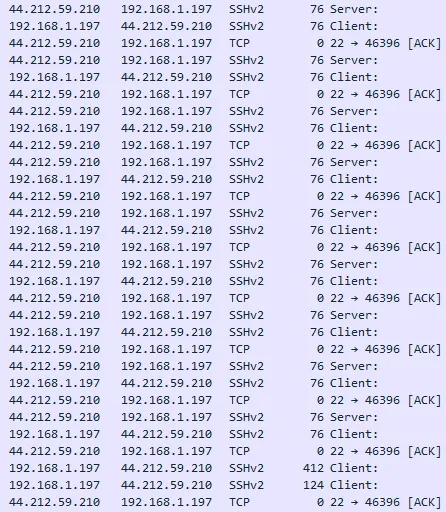
<p>In a reverse SSH shell, it’s SSH over SSH so the packets are double padded + HMAC. Here’s what it looks like:</p>

<p><a href="../assets/img/2023-09-26/terminal_view_2.webp" data-lightbox="/assets/img/2023-09-26/terminal_view_2.webp" data-title="Terminal view 2"><img src="../assets/img/2023-09-26/terminal_view_2.webp" alt="" class="mx-auto" style="" /></a></p>

<p>The JA4SSH for this looks like: c76s76_c71s59_c0s70. We can clearly see a common packet length of 76/76, double padded, and all of the ACKs are coming from the server, meaning it is the server side that is doing the typing. It’s important to note that SSH provides encrypted messages, not an encrypted tunnel, so layer 4 packets, the TCP ACK packets, are sent in the clear. It is with these that we are able to determine which side is initiating the requests. By utilizing JA4SSH, it is now trivial to detect reverse SSH shells.</p>

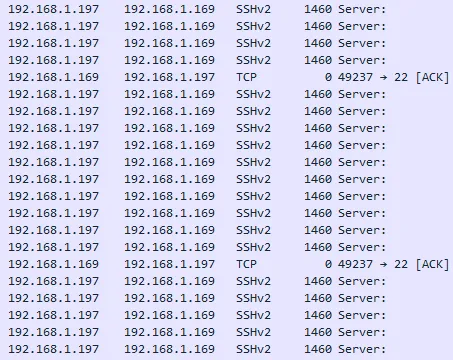
<p>In a SCP file transfer, the TCP Length is maxed out and looks like:</p>

<p><a href="../assets/img/2023-09-26/terminal_view_3.webp" data-lightbox="/assets/img/2023-09-26/terminal_view_3.webp" data-title="Terminal view 3"><img src="../assets/img/2023-09-26/terminal_view_3.webp" alt="" class="mx-auto" style="" /></a></p>

<p>The JA4SH for this looks like: c112s1460_c0s179_c21s0. Notice the maxed out window of s1460, that all SSH packets are coming from the server and all TCP ACK packets are coming from the client. This easily shows that the client requested a file and the server is sending it.</p>

<p>In static environments, like banks, where files are transferred over SFTP between the same systems every day, the JA4SH fingerprints of those connections should remain similar and any major deviation, such as looking like an interactive shell, would be worth alerting on.</p>

<p>JA4SSH makes it easy to detect certain types of SSH activity and delivers fingerprints in a format that is simple to understand. Combining JA4SSH with JA4L can inform the distance of the client/server as well as the operating system of each.</p>

<h2 id="licensing">Licensing</h2>

<p>JA4: TLS Client Fingerprinting is <a href="https://github.com/FoxIO-LLC/ja4/blob/main/LICENSE-JA4">open-source, BSD 3-Clause</a>, same as JA3. This allows any company or tool currently utilizing JA3 to immediately upgrade to JA4 without delay.</p>

<p>JA4S, JA4L, JA4H, JA4X, JA4SSH, and all future additions, (collectively referred to as JA4+) are licensed under the <a href="https://github.com/FoxIO-LLC/ja4/blob/main/LICENSE">FoxIO License 1.1</a>. This license is permissive for most use cases, including for academic and internal business purposes, but is not permissive for monetization. If, for example, a company would like to use JA4+ internally to help secure their own company, that is permitted. If, for example, a vendor would like to sell JA4+ fingerprinting as part of their product offering, they would need to request an OEM license from us.</p>

<p>JA4+ can and is being implemented into open source tools, see the <a href="https://github.com/FoxIO-LLC/ja4/blob/main/License%20FAQ.md">License FAQ</a> for details.</p>

<p>This licensing allows us to provide JA4+ to the world in a way that is open and immediately usable, but also provides us with a way to fund continued support, research into new methods, and the development of the upcoming JA4+ Database. We want everyone to have the ability to utilize JA4+ and are happy to work with vendors and open source projects to help make that happen.</p>

<p><a href="../assets/img/2023-09-26/ask_your_vendor_if_ja4+_is_right_for_you.webp" data-lightbox="/assets/img/2023-09-26/ask_your_vendor_if_ja4+_is_right_for_you.webp" data-title="If you experience a detection lasting longer than 4 hours, contact your vendor right away."><img src="../assets/img/2023-09-26/ask_your_vendor_if_ja4+_is_right_for_you.webp" alt="" class="mx-auto" style="" /></a></p>
<figcaption class="text-center">If you experience a detection lasting longer than 4 hours, contact your vendor right away.</figcaption>

<h2 id="conclusion">Conclusion</h2>

<p>JA4+ provides a suite of modular network fingerprints that are easy to use and easy to share. The use-cases for these fingerprints include scanning for threat actors, malware detection, session hijacking prevention, compliance automation, location tracking, DDoS detection, grouping of threat actors, reverse shell detection, and many more. JA4 (TLS Client Fingerprinting), is licensed under BSD 3-Clause, allowing tools running JA3 to immediately upgrade, while JA4+ (JA4S/L/H/X/SSH) is under the FoxIO License, which is permissive for most use cases except monetization, for that the vendor would need to purchase an OEM license which is what funds further research and the development of the JA4 database (coming soon). We plan to release a new JA4 method about once per quarter so stay tuned.</p>

<p>JA4+ is available here: <a href="https://github.com/FoxIO-LLC/ja4">https://github.com/FoxIO-LLC/ja4</a><br />
For licensing or questions, reach out to us at <a href="http://www.fox-io.com">www.fox-io.com</a><br />
You can reach me directly on <a href="https://www.linkedin.com/in/johnalthouse/">LinkedIn</a> or <a href="https://twitter.com/4A4133">Twitter/X</a>.</p>

<p><strong>JA4+ was created by:</strong><br />
<a href="https://www.linkedin.com/in/johnalthouse/">John Althouse</a></p>

<p><strong>With feedback from:</strong><br />
Josh Atkins<br />
Jeff Atkinson<br />
Joshua Alexander<br />
W.<br />
Joe Martin<br />
Ben Higgins<br />
Andrew Morris<br />
Chris Ueland<br />
Ben Schofield<br />
Matthias Vallentin<br />
Valeriy Vorotyntsev<br />
Timothy Noel<br />
Gary Lipsky<br />
And engineers working at GreyNoise, Hunt, Google, ExtraHop, F5, Driftnet and others.</p>]]></content><author><name>John Althouse</name></author><summary type="html"><![CDATA[TL;DR]]></summary><media:thumbnail xmlns:media="http://search.yahoo.com/mrss/" url="http://blog.foxio.io/assets/img/2023-09-26/do_you_struggle_with_detection.webp" /><media:content medium="image" url="http://blog.foxio.io/assets/img/2023-09-26/do_you_struggle_with_detection.webp" xmlns:media="http://search.yahoo.com/mrss/" /></entry><entry><title type="html">Cut SIEM and AI cost by 80% with LogSlash and cwolves</title><link href="http://blog.foxio.io/cut-siem-and-ai-cost-by-80-with-logslash-and-cwolves" rel="alternate" type="text/html" title="Cut SIEM and AI cost by 80% with LogSlash and cwolves" /><published>2023-06-15T00:00:00+00:00</published><updated>2023-06-15T00:00:00+00:00</updated><id>http://blog.foxio.io/cut-siem-and-ai-cost-by-80-with-logslash-and-cwolves</id><content type="html" xml:base="http://blog.foxio.io/cut-siem-and-ai-cost-by-80-with-logslash-and-cwolves"><![CDATA[<p>In this blog, I go over how the LogSlash method has evolved over the last few months and new technologies that it is being implemented into. I’ll also explain how LogSlash can significantly reduce the cost to send data to SIEMs as well as train AI on transactional data.</p>

<h2 id="tldr">TL;DR</h2>

<p>LogSlash can reduce the cost of your logging infrastructure and the cost to train AI models on transactional data by 80%.</p>

<p>cwolves is a startup that uses AI to automatically LogSlash and normalize any log type. It is extremely performant and cost effective. They created a Splunk plugin for LogSlash.</p>

<p>LogSlash has also been tested on Vector, Logstash, Python, Kafka, and Cribl. Performance and ease of use are key.</p>

<p>LogSlash code is available here: <a href="https://github.com/FoxIO-LLC/LogSlash">https://github.com/FoxIO-LLC/LogSlash</a></p>

<p>LogSlash is patented and licensed under the FoxIO License which is permissive for most use cases, including internal business use. The main use case it’s not permissive for is monetization, that requires a separate OEM license which helps fund further R&amp;D.</p>

<h2 id="background-on-logslash">Background on LogSlash</h2>

<p>We released LogSlash, a method for reducing log volume without reducing analytical value, in <a href="/introducing-logslash-and-the-end-of-traditional-logging">this blog post from January</a>. Here’s a quick refresher on how LogSlash works:</p>

<p>LogSlash intelligently reduces similar logs within a defined time window down to a single log line. For example, if an IP communicates to another IP 100 times a minute, instead of logging 100 log lines, LogSlash produces 1 log that says the event happened 100 times within that minute. Analytical value is retained while data volume is drastically reduced.</p>

<p><a href="../assets/img/2023-06-15/logslash.webp" data-lightbox="/assets/img/2023-06-15/logslash.webp" data-title="Simplified example of how LogSlash works"><img src="../assets/img/2023-06-15/logslash.webp" alt="" class="mx-auto" style="" /></a></p>
<figcaption class="text-center">Simplified example of how LogSlash works</figcaption>

<p>Over the past few months we’ve worked with several large companies and have found that our initial estimate of 50% volume savings was wrong. These businesses are actually seeing around 80% log volume reduction when using LogSlash. Multiply those savings across trillions of logs and you can see how the cost benefit can be quite enormous, allowing organizations the headroom to send logs to their SIEM that they otherwise couldn’t afford.</p>

<p>LogSlash isn’t just for SIEMs. Training AI models on transactional data is becoming increasingly common and extremely expensive. Running these logs through LogSlash prior to training the AI model on them can save an equal amount of training time and compute. You just want to make sure your model supports the “logslash” field so it knows how to duplicate the occurrences of data while training on LogSlashed logs.</p>

<h2 id="development">Development</h2>

<p>The LogSlash method is designed to be implemented into many existing technologies and languages. The difference between them comes down to performance and ease of configuration, as each log type requires its own configuration. We originally released LogSlash as a set of Vector.dev scripts. They worked but the scripts proved to be extremely complicated and time consuming to create.</p>

<p><a href="../assets/img/2023-06-15/vector_script.webp" data-lightbox="/assets/img/2023-06-15/vector_script.webp" data-title="Vector script"><img src="../assets/img/2023-06-15/vector_script.webp" alt="" class="mx-auto" style="" /></a></p>

<p><a href="https://www.linkedin.com/in/steven-hostetler/">Steven Hostetler</a> released LogSlash as a Logstash config. <a href="https://github.com/FoxIO-LLC/LogSlash/tree/main/Logstash">Slash-N-Stash</a> worked well but again, it took a lot of effort to build the config and get it working correctly.</p>

<p><a href="../assets/img/2023-06-15/slash_n_stash_repo.webp" data-lightbox="/assets/img/2023-06-15/slash_n_stash_repo.webp" data-title="Slash-N-Stash repository"><img src="../assets/img/2023-06-15/slash_n_stash_repo.webp" alt="" class="mx-auto" style="" /></a></p>

<p>We developed LogSlash on Python and Kafka but the performance was so cost prohibitive that it wasn’t even worth releasing as the cost to run LogSlash needs to be infinitesimal compared to the savings.</p>

<p>We developed LogSlash on Cribl and this was a bit easier to develop compared to Vector and Logstash. However, it still requires you to build a different config for each log type and you need a Cribl license which is volume based. We’ve yet to test it at scale so performance impact is still unknown.</p>

<h2 id="enter-cwolves">Enter cwolves</h2>

<p>That brings us to cwolves, a startup entirely based around the LogSlash method and a licensee of FoxIO. They’re using a small AI model to recognize log field names, normalize them, and determine how to configure LogSlash to handle those fields. This means there’s no need to build normalization and LogSlash configs, those are now done automatically. The performance is incredible too.</p>

<p>The AI-based normalization and config builder is brilliant. For example, if your log uses the field name “data_win_eventdata_ip_src”, it automatically recognizes that as “Source IP” and knows how to configure LogSlash for that field. It will present you with the configuration it built so you can still manually modify it how you see fit, but the effort of building these configs is now gone. Amazing! For some organizations, cwolves may be worth it just for the auto-normalization alone.</p>

<p><a href="../assets/img/2023-06-15/cwolves_dashboard.webp" data-lightbox="/assets/img/2023-06-15/cwolves_dashboard.webp" data-title="cwolves dashboard"><img src="../assets/img/2023-06-15/cwolves_dashboard.webp" alt="" class="mx-auto" style="" /></a></p>

<p>That’s LogSlash configuration writing and performance taken care of. Another hurdle is implementation. cwolves aims to solve this with easy cloud or on-prem implementation with the ability to get started on-cloud, in minutes, for free. This is a great way to test out LogSlash though I suspect that most organizations will want this on-prem or within their own VPC, so it’s great that they offer that option.</p>

<p>The final hurdle to LogSlash is SIEM and AI model support. That is, they need to be aware that if the field “logslash=” exists in the log line, then it needs to duplicate the occurrence of each field by the logslash value while dividing fields that end in _total by the logslash value. This is straightforward to implement and cwolves is already developing a Splunk App that does just this.</p>

<p><a href="../assets/img/2023-06-15/splunk_dashboard.webp" data-lightbox="/assets/img/2023-06-15/splunk_dashboard.webp" data-title="Splunk dashboard"><img src="../assets/img/2023-06-15/splunk_dashboard.webp" alt="" class="mx-auto" style="" /></a></p>

<p>With that Splunk App, cwolves makes LogSlash ready to go for existing Splunk customers. It also makes Splunk suddenly affordable and an attractive option for those who are SIEM shopping.</p>

<p>Try out LogSlash and cwolves at <a href="https://cwolves.com/">https://cwolves.com/</a></p>

<p><a href="mailto:john@foxio.io">Contact us</a> at FoxIO if you’d like to know more about LogSlash or if you’re interested in an OEM license.</p>]]></content><author><name>John Althouse</name></author><summary type="html"><![CDATA[In this blog, I go over how the LogSlash method has evolved over the last few months and new technologies that it is being implemented into. I’ll also explain how LogSlash can significantly reduce the cost to send data to SIEMs as well as train AI on transactional data.]]></summary><media:thumbnail xmlns:media="http://search.yahoo.com/mrss/" url="http://blog.foxio.io/assets/img/2023-06-15/cwolves_dashboard.webp" /><media:content medium="image" url="http://blog.foxio.io/assets/img/2023-06-15/cwolves_dashboard.webp" xmlns:media="http://search.yahoo.com/mrss/" /></entry><entry><title type="html">Introducing LogSlash and the End of Traditional Logging</title><link href="http://blog.foxio.io/introducing-logslash-and-the-end-of-traditional-logging" rel="alternate" type="text/html" title="Introducing LogSlash and the End of Traditional Logging" /><published>2023-01-21T00:00:00+00:00</published><updated>2023-01-21T00:00:00+00:00</updated><id>http://blog.foxio.io/introducing-logslash-and-the-end-of-traditional-logging</id><content type="html" xml:base="http://blog.foxio.io/introducing-logslash-and-the-end-of-traditional-logging"><![CDATA[<p><strong>LogSlash</strong> is a new standard method that doubles the efficiency and value of existing log platforms by doubling capacity and cutting logging costs in half. It does this by performing a time-window-based, intelligent reduction of logs in transit. LogSlash was created by <a href="https://www.linkedin.com/in/johnalthouse/">John Althouse</a>, who led the creation of standard methods like <a href="https://engineering.salesforce.com/tls-fingerprinting-with-ja3-and-ja3s-247362855967/">JA3/S</a> and <a href="https://engineering.salesforce.com/easily-identify-malicious-servers-on-the-internet-with-jarm-e095edac525a/">JARM</a> that are built into many vendor products, including <a href="https://aws.amazon.com/about-aws/whats-new/2022/11/amazon-cloudfront-supports-ja3-fingerprint-headers/">AWS</a>, <a href="https://cloud.google.com/chronicle/docs/reference/udm-field-list#tlsclient">Google</a>, <a href="https://learn.microsoft.com/en-us/azure/firewall/idps-signature-categories">Azure</a>, and used by the Fortune 500.</p>

<p>This blog post introduces LogSlash, the method, benefits, and requirements. For more technical details, please visit our GitHub.</p>

<p>LogSlash is free for internal business use and is available here: <a href="https://github.com/FoxIO-LLC/LogSlash">https://github.com/FoxIO-LLC/LogSlash</a></p>

<p><a href="../assets/img/2023-01-21/locks.jpg" data-lightbox="/assets/img/2023-01-21/locks.jpg" data-title="My mouse-drawn version of a generic security blog post image"><img src="../assets/img/2023-01-21/locks.jpg" alt="" class="mx-auto" style="" /></a></p>
<figcaption class="text-center">My mouse-drawn version of a generic security blog post image</figcaption>

<h2 id="the-too-many-logs-problem">The Too-Many-Logs Problem</h2>

<p>Data logging is a foundational capability for all organizations. Logs are used in Machine Learning (ML) and Artificial Intelligence (AI) algorithms to track activity of interest and are critical for understanding the performance, availability, and security of the world’s infrastructure. As such, organizations tend to want to log everything, and rightfully so. Security Operators, for example, don’t want to miss potentially malicious activity. For various reasons they may also need to search across those logs going back several years. The solutions to date for processing and storing all of these logs have essentially been, ‘put the Big Data into a Data Lake or Data Warehouse and run searches and algorithms against it.’ This has led the world to spend ~$215 billion on logging infrastructure, licensing, power, and space in 2021, according to <a href="https://www.statista.com/statistics/551501/worldwide-big-data-business-analytics-revenue/">Statista</a>. But what if we could cut that number in half?</p>

<p>Most organizations suffer from a too-many-logs problem where the cost of logging is straining budgets. The primary costs behind logging infrastructures are log ingestion and log processing/search, both in compute and licensing. Some log management licensing is based on the overall compute required, while others are based on log ingest volume. In either case, fewer logs equals less licensing costs as less compute is required to ingest, index, process, and search across the remaining logs. So how do we get less logs without losing valuable data?</p>

<p>The ultimate point of logging data is to understand <em>what happened</em>. In our quest to understand what happened, we tend to log and store everything. And it’s important to remember that in a work environment, both humans and systems tend to do the same process, over and over again. If a system does something 1,000 times in one minute, such as a load balancer connecting to an application server, do we really need to process, store, and search across 1,000 log lines that say the same thing? What if instead, we just process, store, and search across one log line that says this thing happened 1,000 times within a one-minute window? Both methods tell the same story of what happened and they both have the same value, but the latter is exceedingly more efficient to process, store, and run searches/algorithms against.</p>

<h2 id="the-logslash-method">The LogSlash Method</h2>

<p>LogSlash is a method for the reduction of log volume without sacrificing analytical capability. It can sit between your log producers (e.g, firewalls, systems, applications) and your existing log platform (e.g., Splunk, Databricks, Snowflake, S3). No need to change your logging infrastructure as this is designed to slot into any existing setup.</p>

<p>With LogSlash, 10TB/day of logs flowing into Splunk can be reduced to 5TB/day without any loss to the value of the logs. LogSlash does this by performing a time-window based consolidation of similar logs using configurable transforms to retain what’s valuable to you.</p>

<p>As an example, Bob connects to Gmail and starts clicking through his emails. While going through the emails, he clicks a malicious link.</p>

<p><a href="../assets/img/2023-01-21/logslash_firewall.png" data-lightbox="/assets/img/2023-01-21/logslash_firewall.png" data-title="LogSlash firewall"><img src="../assets/img/2023-01-21/logslash_firewall.png" alt="" class="mx-auto" style="" /></a></p>

<p>These logs then flow through the LogSlash method before ingest into the logging platform following this logical configuration:</p>

<pre><code class="language-spl">timewindow = 60s
Group\_by = \[ host, type, domain, dstip, dstport, proto, action \]
Fields\_ignored = srcport
Fields\_concatinated =
Fields\_sum = bytes
</code></pre>

<p>The output fields now include “timestamp-end”, “bytes-total” and “logslash,” which shows how many times the particular event occurred. We’re ignoring all but the first srcport as that field holds little analytical value. If we wanted to retain each srcport, we could configure LogSlash to concatenate them with a comma delimiter instead.</p>

<p><a href="../assets/img/2023-01-21/logslash.webp" data-lightbox="/assets/img/2023-01-21/logslash.webp" data-title="LogSlash output"><img src="../assets/img/2023-01-21/logslash.webp" alt="" class="mx-auto" style="" /></a></p>

<p>In this simplified example, we can see that Bob connected to Gmail 8 times over TLS/443 within a 53-second window with a total byte count of 3365kb and also attempted to connect to a malicious site once. LogSlash reduced the logs flowing into the log platform by 78% without any loss to the understanding of what happened. This can significantly reduce the cost to index, store, and process/search against log data, as well as reduce log platform licensing costs.</p>

<p>In testing LogSlash with a one-minute time window on AWS VPC Flow logs using normal corporate internet traffic, we found that on average, LogSlash reduced VPC Flow logs by 50%. In a production environment where the same systems are communicating to the same systems thousands of times a minute, such as load balancers communicating to application servers, LogSlash can reduce logs by as much as 95%, on average, without reducing the value of the logs.</p>

<p>In testing LogSlash with <a href="https://zeek.org/">Zeek</a> log data from corporate internet traffic, we found a reduction of 38% in SSL logs, 63% in Conn logs, 83% in DNS logs, 91% in HTTP logs, and 93% in File logs. The large delta between the savings with SSL logs and HTTP logs is due to SSL logging each <em>connection</em> which can persist for minutes whereas HTTP logs each <em>transaction</em>. It is transaction-based logging (e.g. application logs, S3 access logs) which can see massive savings with LogSlash.</p>

<p>For logs with unique identifiers (GUIDs), like in AWS CloudTrail, LogSlash can be configured to ignore all but the first GUID in a set of similar logs. This maintains a GUID to identify the set of events which can still be used as a primary key for log retrieval. Shared GUIDs hold a little more analytical value for pivoting between log types and can be concatenated if there are no other shared pivot points which depend on the log type. In either case, LogSlash still provides significant savings without sacrificing analytical capability.</p>

<h2 id="using-logslash-with-other-log-reduction-methods">Using LogSlash with other Log Reduction Methods</h2>

<p><a href="../assets/img/2023-01-21/architecture_element.webp" data-lightbox="/assets/img/2023-01-21/architecture_element.webp" data-title="Just one example of where LogSlash could slot in your existing pipeline."><img src="../assets/img/2023-01-21/architecture_element.webp" alt="" class="mx-auto" style="" /></a></p>
<figcaption class="text-center">Just one example of where LogSlash could slot in your existing pipeline.</figcaption>

<p>LogSlash is designed to work with other common log reduction methods such as standard compression, data deletion, and deduplication.</p>

<p><strong>Deduplication</strong>. Deduplication is needed when you have a system that tends to log the <em>exact</em> same thing multiple times in a row. LogSlash is designed to reduce <em>similar</em> logs down to a single log without any loss to the value of what happened. LogSlash should be performed after deduplication and data deletion methods have already been performed.</p>

<p><strong>Data Deletion</strong>. There are a number of technologies that facilitate removing erroneous data from logs before being passed off to their destination, such as removing the bloated Description field from Windows Event Logs. LogSlash provides significant savings on top of these standard data deletion methods.</p>

<p><strong>Compression</strong>. ASCII compression tools like Gzip are used to losslessly compress logs for cheaper storage. When a search is performed against these logs, they are uncompressed and each log line is passed through the processor. Sending logs through LogSlash and then compressing the output significantly reduces log file size on disk compared to solely using compression. LogSlash also significantly reduces the compute and RAM required to uncompress and search across logs, as fewer bits are being passed through the processor at read time.</p>

<h2 id="implementing-logslash">Implementing LogSlash</h2>

<p><a href="../assets/img/2023-01-21/architecture_integrated.webp" data-lightbox="/assets/img/2023-01-21/architecture_integrated.webp" data-title="LogSlash could also be built directly into existing products for a more seamless, integrated experience."><img src="../assets/img/2023-01-21/architecture_integrated.webp" alt="" class="mx-auto" style="" /></a></p>
<figcaption class="text-center">LogSlash could also be built directly into existing products for a more seamless, integrated experience.</figcaption>

<p>LogSlash was designed as a method that could be easily implemented into existing logging technologies and tools that you’re using today. Much like how JA3 was originally released as a Zeek Script before being implemented into vendor technologies, we are releasing LogSlash as <a href="https://vector.dev/">Vector</a> scripts. Vector is an open-source, lightweight, ultra-fast logging pipeline tool that contains the functions necessary to support LogSlash. We will soon be releasing LogSlash as Kafka Streams scripts and Cribl packs as well.</p>

<p>Much like log normalization, LogSlash requires a separate configuration for each log type so you can specify what fields are important and what fields can be transformed or ignored. As such, these configs can be built as part of the normalization development process. We are developing and releasing LogSlash scripts that can either be used directly or as templates for your own use cases.</p>

<p>LogSlash could also be implemented directly into the log source. As an example, S3 Audit logs in AWS could have an option to LogSlash before storing. Using LogSlash as a built-in option, developed by that technology’s team, would allow organizations to log what they otherwise potentially couldn’t afford, and at no extra effort to their observability teams.</p>

<p>In order for LogSlash to seamlessly integrate with log platforms, graphing tools, and anything else that relies on counting log lines to produce graphs and totals, those tools will need to be aware of LogSlash. For example, if you run a timechart function on Splunk against LogSlashed logs, it would require some fancy SPL’ing to output the correct graph because Splunk does not yet natively multiply or divide the amount of field values by the logslash value. Fortunately, adding support for handling LogSlashed logs is fairly straight-forward. Fast moving upstarts in log analysis, like <a href="https://www.gravwell.io/">Gravwell</a>, have stated LogSlash support will be available in their next release cycle. We look forward to seeing many organizations benefit from dramatically reduced log data as more tools add LogSlash support in the coming months.</p>

<h2 id="future-development">Future Development</h2>

<p><a href="../assets/img/2023-01-21/map.jpg" data-lightbox="/assets/img/2023-01-21/map.jpg" data-title="This mouse-drawn pew-pew map doesn’t really have a purpose, honestly."><img src="../assets/img/2023-01-21/map.jpg" alt="" class="mx-auto" style="" /></a></p>
<figcaption class="text-center">This mouse-drawn pew-pew map doesn’t really have a purpose, honestly.</figcaption>

<p>While LogSlash is currently a set of simple scripts with a separate script for each log type, we’re working on a system that will adaptively recognize data types, so it can intelligently apply the appropriate LogSlash functions universally. This system will make it easy to onboard different log types with an initial configuration that can be tweaked. Logs will be LogSlashed on a rolling one-minute window by default, but this window will be configurable with potential savings dynamically displayed along with sample outputs.</p>

<h2 id="conclusion">Conclusion</h2>

<p>LogSlash is a new standard method for the reduction of log volume without reducing log value and is designed to be implemented into existing technologies and logging pipelines. It’s a much more efficient approach to traditional logging. Essentially, why log, store, and search across 1,000 log lines that say the same thing when we can log, store and search across 1 log line that says the thing happened 1,000x? LogSlash significantly reduces compute and storage requirements and has the potential to double the value of log platforms that support it. Initially being released as a set of Vector scripts, we will soon be providing LogSlash as Kafka Streams and Cribl Packs and are working toward direct integration in logging pipeline and platform tools.</p>

<p>LogSlash is available here: <a href="https://github.com/FoxIO-LLC/LogSlash">https://github.com/FoxIO-LLC/LogSlash</a></p>

<p>LogSlash was created by <a href="https://www.linkedin.com/in/johnalthouse/">John Althouse</a></p>

<p>LogSlash is patented by <a href="https://www.foxio.io/">FoxIO, LLC</a> — Patent US 10,877,972</p>

<p>Please <a href="mailto:john@foxio.io">reach out to us</a> if you have any questions or have interest in commercial vendor licensing.</p>

<p>We are really excited to also share our new, innovative software license with the industry! We worked with renowned Open Source License expert Heather Meeker, along with legal professors and licensing lawyers, to create the <a href="https://github.com/FoxIO-LLC/LogSlash/blob/main/LICENSE">FoxIO License</a>. It is similar to the intention behind the <a href="https://nmap.org/npsl/">Nmap Public Source License</a>, while being only 2 pages, human readable, and reusable. Those familiar with licensing know that it takes a lot of expertise and time to create small, readable licenses. A lot of care and effort went into this. The FoxIO License is free to use for your own projects. Read more about it in an upcoming blog post!</p>]]></content><author><name>John Althouse</name></author><summary type="html"><![CDATA[LogSlash is a new standard method that doubles the efficiency and value of existing log platforms by doubling capacity and cutting logging costs in half. It does this by performing a time-window-based, intelligent reduction of logs in transit. LogSlash was created by John Althouse, who led the creation of standard methods like JA3/S and JARM that are built into many vendor products, including AWS, Google, Azure, and used by the Fortune 500.]]></summary><media:thumbnail xmlns:media="http://search.yahoo.com/mrss/" url="http://blog.foxio.io/assets/img/2023-01-21/logslash.webp" /><media:content medium="image" url="http://blog.foxio.io/assets/img/2023-01-21/logslash.webp" xmlns:media="http://search.yahoo.com/mrss/" /></entry></feed>